Workflow orchestration
Step Functions
Day Seven #
The asset processor currently hides validation, transformation, state changes, and failure handling inside one Lambda invocation. Logs can tell us what the worker did, but the infrastructure cannot show which operation is running, which one failed, or which retry is next.
Today we give that responsibility to Step Functions. Each uploaded asset becomes a Standard Workflow execution with visible validation, transformation, accepted, rejected, and failed paths.
To keep things simple and focused on their AWS services, we will also create one reusable test user. A shared Cognito pool is a convenience for this tutorial: readers configure the user once, while every preview still receives its own callback-specific app client.
Goal #
For every preview environment:
- keep S3 notifications buffered by the existing SQS queue
- start one Standard Workflow execution for each uploaded asset
- make validation, transformation, completion, rejection, retries, and failures visible
- keep deterministic output keys and owner-authorized delivery
- give every workflow Lambda only the permissions for its step
- record an exhausted processing failure in DynamoDB instead of leaving an asset stuck at
processing - move the Cognito user pool and hosted UI domain into a long-lived stack
- create one reusable test user as a tutorial convenience while keeping callback-specific app clients disposable
- move Lambda and CI from the deprecated Node.js 20 runtime to Node.js 24
The application still presents the same flow to its user:
uploading -> processing -> ready
An invalid file still ends at rejected. An operational failure now has its own terminal failed state.
The new processing boundary #
High-level AWS architecture #
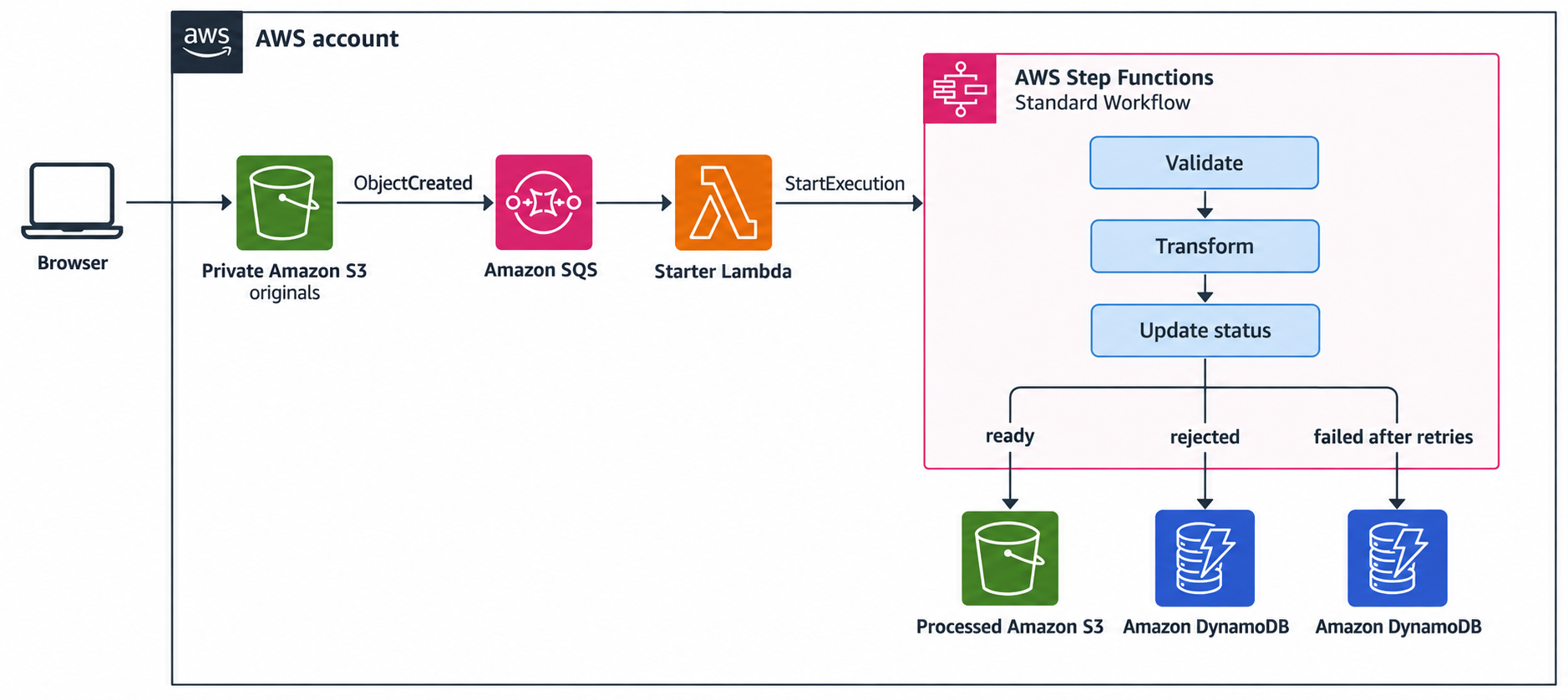
SQS continues to buffer upload notifications, but a small starter Lambda now hands each asset to a Standard Step Functions workflow. The workflow makes its validation, transformation, retries, and terminal outcomes visible instead of hiding them inside one worker invocation.
Workflow execution flow #
The detailed flow traces the event hand-off, workflow start, and durable outcomes:
SQS and Step Functions own different responsibilities. The queue absorbs notification bursts and retries a failure to start an execution. Once Step Functions accepts an execution, the queue message is complete and the state machine owns task order and retries.
Keeping both services is not redundant: SQS protects the hand-off, while Step Functions persists workflow state.
Multiple steps #
The single worker was appropriate while processing meant one short operation. It was cheap, easy to deploy, and easy to reason about.
As the application grows, the worker would need to remember which work completed, avoid repeating side effects, implement backoff, persist intermediate failures, and explain its current state to an operator. Those are orchestration concerns.
Step Functions adds value when a process has multiple named steps, branches, retries, or long waits. It is unnecessary for a single idempotent function that already succeeds or fails as one unit.
This workflow stays deliberately small. Later chapters can add image analysis or event publication without turning one Lambda handler into a private workflow engine.
Standard instead of Express #
Step Functions offers Standard and Express Workflows. We use Standard here because:
- execution state persists between transitions
- each execution has durable visual history
- execution names provide an idempotency boundary
- the workflow may eventually gain slower analysis or approval steps
- the preview has low enough volume that per-transition billing is straightforward
Standard Workflows follow exactly-once workflow execution semantics unless the definition explicitly retries a state. The surrounding S3 and SQS delivery remains at-least-once, so the application must still be idempotent at the boundary.
Express Workflows suit high-volume, short, idempotent processing. They are billed by requests, duration, and memory rather than Standard's state transitions. They do not provide the same durable execution history or execution-name idempotency, so they are the wrong trade-off for what we need.
Reusable identity #
The existing preview stack owns all three Cognito resources:
User pool + hosted UI domain + app client
That gives perfect stack isolation, but it asks to provision another user whenever a pull request closes. As a simplification, we keep one tutorial user available across previews:
AssetSeriesAuth
  user pool             long-lived
  hosted UI domain      long-lived
  users                 long-lived

Stack-PR123
  app client            disposable
  callback URL          specific to this CloudFront preview
A Cognito app client describes one application integration. Each preview has a different CloudFront callback URL, so the app client still belongs in the preview stack. The shared pool and user are demo only. Production isolation should follow the application's security and tenancy requirements.
Authentication stack #
Add lib/auth-stack.ts. Export names form the contract consumed by every preview stack:
export const authExports = {
  userPoolId: 'AssetSeriesUserPoolId',
  hostedUiUrl: 'AssetSeriesUserPoolHostedUiUrl',
} as const;

export class AuthStack extends cdk.Stack {
  constructor(scope: Construct, id: string, props?: cdk.StackProps) {
    super(scope, id, props);

    const users = new cognito.UserPool(this, 'Users', {
      selfSignUpEnabled: false,
      signInAliases: { email: true },
      standardAttributes: { email: { required: true, mutable: false } },
      passwordPolicy: {
        minLength: 14,
        requireDigits: true,
        requireLowercase: true,
        requireUppercase: true,
        requireSymbols: true,
      },
      accountRecovery: cognito.AccountRecovery.EMAIL_ONLY,
      removalPolicy: cdk.RemovalPolicy.RETAIN,
    });

    const hostedUiDomain = users.addDomain('HostedUiDomain', {
      cognitoDomain: {
        domainPrefix: `asset-series-${this.account}-${this.region}`.toLowerCase(),
      },
    });

    new cdk.CfnOutput(this, 'UserPoolId', {
      value: users.userPoolId,
      exportName: authExports.userPoolId,
    });
    new cdk.CfnOutput(this, 'UserPoolHostedUiUrl', {
      value: hostedUiDomain.baseUrl(),
      exportName: authExports.hostedUiUrl,
    });
  }
}
RETAIN is intentional. Accidentally deleting the authentication stack must not silently delete its user directory. It also means final account cleanup has a manual step; we will make that explicit later.
The outputs contain resource identifiers and the public hosted UI URL. Do not put a test password or any other secret in CloudFormation outputs because outputs are not encrypted or redacted.
Add a dedicated entry point at bin/auth.ts:
const app = new cdk.App();
const account = process.env.CDK_DEFAULT_ACCOUNT;
const region = process.env.CDK_DEFAULT_REGION;

if (!account || !region) {
  throw new Error('CDK_DEFAULT_ACCOUNT and CDK_DEFAULT_REGION are required');
}

new AuthStack(app, 'AssetSeriesAuth', {
  env: { account, region },
  description: 'Long-lived authentication shared by AWS from idea to infra previews',
});
Deploy this stack once per account and region:
export CDK_DEFAULT_ACCOUNT=$(aws sts get-caller-identity \
  --query Account --output text --profile dev)
export CDK_DEFAULT_REGION=us-east-1

npx cdk deploy AssetSeriesAuth \
  --app "npx ts-node bin/auth.ts" \
  --profile dev
Creating the user #
This is the one-time replacement for creating a user in every preview pool:
REGION=$CDK_DEFAULT_REGION
POOL_ID=$(aws cloudformation describe-stacks \
  --stack-name AssetSeriesAuth \
  --region "$REGION" \
  --query "Stacks[0].Outputs[?OutputKey=='UserPoolId'].OutputValue | [0]" \
  --output text \
  --profile dev)

EMAIL=you@example.com
read -rs PASSWORD

aws cognito-idp admin-create-user \
  --user-pool-id "$POOL_ID" \
  --username "$EMAIL" \
  --user-attributes Name=email,Value="$EMAIL" Name=email_verified,Value=true \
  --message-action SUPPRESS \
  --region "$REGION" \
  --profile dev

aws cognito-idp admin-set-user-password \
  --user-pool-id "$POOL_ID" \
  --username "$EMAIL" \
  --password "$PASSWORD" \
  --permanent \
  --region "$REGION" \
  --profile dev
Use a unique password that satisfies the pool policy and keep it out of the repository, shell history, CloudFormation, and CI variables.
Import the pool into each preview #
Remove the user pool and domain from Stack. Import the shared pool, but continue creating one app client with the exact preview callback URL:
const users = cognito.UserPool.fromUserPoolId(
  this,
  'SharedUsers',
  cdk.Fn.importValue(authExports.userPoolId),
);
const hostedUiUrl = cdk.Fn.importValue(authExports.hostedUiUrl);

const webClient = users.addClient('WebClient', {
  oAuth: {
    flows: { authorizationCodeGrant: true },
    scopes: [cognito.OAuthScope.OPENID, cognito.OAuthScope.EMAIL],
    callbackUrls: [`https://${distribution.domainName}/`],
    logoutUrls: [`https://${distribution.domainName}/`],
    defaultRedirectUri: `https://${distribution.domainName}/`,
  },
  preventUserExistenceErrors: true,
});
CloudFormation exports create a real dependency. A preview cannot deploy before AssetSeriesAuth exists, and the authentication export cannot be removed while previews import it. Destroy preview stacks before deliberately changing or removing that contract.
The preview workflow now performs a clear preflight check:
aws cloudformation describe-stacks \
  --stack-name AssetSeriesAuth \
  --query 'Stacks[0].StackStatus' \
  --output text
Closing a pull request deletes its app client. The shared pool, domain, and user survive.
SQS #
S3 already publishes ObjectCreated notifications to SQS. We replace the old worker consumer with a small workflow starter:
export const handler = async (event: any) => {
  const batchItemFailures = [];

  for (const message of event.Records ?? []) {
    try {
      const assets = parseAssetRecords(message.body);
      for (const asset of assets) await startWorkflow(asset);
    } catch (error) {
      console.error('Could not start asset workflow', {
        messageId: message.messageId,
        error,
      });
      batchItemFailures.push({ itemIdentifier: message.messageId });
    }
  }

  return { batchItemFailures };
};
Partial batch responses return only failed SQS messages to the queue.
The parser accepts only the object-key shape created by the upload API:
export const parseAssetRecords = (body: string) => {
  const event = JSON.parse(body);
  const records = event.Records ?? [];
  if (!Array.isArray(records) || records.length === 0) {
    throw new Error('S3 notification contains no records');
  }

  return records.map((record: any) => {
    const sourceKey = decodeURIComponent(
      record?.s3?.object?.key?.replace(/\+/g, ' ') ?? '',
    );
    const match = sourceKey.match(
      /^uploads\/originals\/([0-9a-f-]+)\.(png|jpg)$/,
    );
    if (!match) throw new Error(`Unexpected object key: ${sourceKey}`);
    return { assetId: match[1], sourceKey };
  });
};
Idempotent workflow #
Use the asset ID as the Standard Workflow execution name:
await stepFunctions.send(new StartExecutionCommand({
  stateMachineArn: requiredEnv('STATE_MACHINE_ARN'),
  name: asset.assetId,
  input: JSON.stringify(asset),
}));
S3 notifications and SQS consumers can deliver duplicates. Standard Workflow execution names remain unique within an account, Region, and state machine for 90 days. Repeating the same running execution is idempotent; repeating a closed execution returns ExecutionAlreadyExists.
The starter treats that error as a successfully handled duplicate:
} catch (error: any) {
  if (error?.name === 'ExecutionAlreadyExists') {
    console.info('Asset workflow already exists', { assetId: asset.assetId });
    return;
  }
  throw error;
}
This is only one layer of idempotency. The output key remains deterministic, and DynamoDB remains the authority that connects the asset ID to its source key.
Workflow tasks #
The old worker Lambda had permission to read and write the asset bucket and table. Replace it with narrow functions:
| Task | Responsibility | Data access |
|---|---|---|
| Workflow starter | Parse S3 notifications and start executions | states:StartExecution |
| Validate upload | Match the DynamoDB record, mark processing, inspect file bytes |
table GetItem/UpdateItem, original GetObject |
| Transform asset | Copy the accepted original to its deterministic output key | original GetObject, processed PutObject |
| Mark asset ready | Store ready and the output key |
table UpdateItem |
| Reject invalid asset | Delete invalid bytes and store rejected |
original DeleteObject, table UpdateItem |
| Record processing failure | Store failed after retries are exhausted |
table UpdateItem |
Validate declared content #
The validation function loads the record, changes its state to processing, and reads only the first sixteen object bytes:
const { Item: asset } = await db.send(new GetCommand({
  TableName: requiredEnv('ASSETS_TABLE_NAME'),
  Key: { assetId },
  ConsistentRead: true,
}));
if (!asset || asset.sourceKey !== sourceKey) {
  throw new Error('Upload has no matching asset record');
}

await db.send(new UpdateCommand({
  TableName: requiredEnv('ASSETS_TABLE_NAME'),
  Key: { assetId },
  UpdateExpression: 'SET #status = :status, updatedAt = :now',
  ExpressionAttributeNames: { '#status': 'status' },
  ExpressionAttributeValues: {
    ':status': 'processing',
    ':now': new Date().toISOString(),
  },
  ConditionExpression: 'attribute_exists(assetId)',
}));

const sample = await s3.send(new GetObjectCommand({
  Bucket: requiredEnv('ASSET_BUCKET_NAME'),
  Key: sourceKey,
  Range: 'bytes=0-15',
}));
It returns valid: true with the deterministic output key, or valid: false with a safe rejection reason. Invalid content is a business outcome, so it takes an explicit branch instead of consuming retries.
Record operational failure #
An exception is different from a rejected file. After Step Functions exhausts retries, the failure task stores:
{
  "status": "failed",
  "error": "Processing failed; inspect the Step Functions execution history"
}
The full task error stays in the execution history and function log. The browser receives a safe message without internal exception details.
Keep expiresAt on failed and rejected records so abandoned input eventually leaves the metadata table. A successful transition to ready removes it because accepted assets have an application-managed lifetime.
Update the status API and browser polling loop to recognize failed as terminal:
if (asset.status === 'rejected' || asset.status === 'failed') {
  result.error = asset.error;
}
if (['ready', 'rejected', 'failed'].includes(data.asset.status)) {
  return data.asset;
}
Without this change, a correctly failed workflow would look like a polling timeout to its user.
State machine #
Create one LambdaInvoke state for each task. Returning only the Lambda payload keeps the workflow data small and lets each task pass the asset context forward:
const lambdaTask = (id: string, handler: lambda.IFunction) =>
  new tasks.LambdaInvoke(this, id, {
    lambdaFunction: handler,
    payloadResponseOnly: true,
  });

const invokeValidate = lambdaTask('Validate upload', validateAsset);
const invokeTransform = lambdaTask('Transform asset', transformAsset);
const invokeComplete = lambdaTask('Mark asset ready', completeAsset);
const invokeReject = lambdaTask('Reject invalid asset', rejectAsset);
const invokeRecordFailure = lambdaTask('Record processing failure', recordFailure);
Add bounded exponential retry and a common failure path:
for (const task of [invokeValidate, invokeTransform, invokeComplete, invokeReject]) {
  task.addRetry({
    errors: ['States.TaskFailed'],
    interval: cdk.Duration.seconds(2),
    maxAttempts: 3,
    backoffRate: 2,
  });
  task.addCatch(invokeRecordFailure, { resultPath: '$.failure' });
}
The catch stores the error under failure while preserving assetId and the rest of the workflow input. Record processing failure logs the detailed failure, writes the safe terminal state, and enters an explicit Step Functions Fail state.
The business branch remains separate:
const definition = invokeValidate.next(
  new sfn.Choice(this, 'Bytes match declared image type?')
    .when(
      sfn.Condition.booleanEquals('$.valid', true),
      invokeTransform.next(invokeComplete).next(ready),
    )
    .otherwise(invokeReject.next(rejected)),
);
Finally, create a Standard state machine with a five-minute ceiling:
const assetWorkflow = new sfn.StateMachine(this, 'AssetWorkflow', {
  definitionBody: sfn.DefinitionBody.fromChainable(definition),
  stateMachineType: sfn.StateMachineType.STANDARD,
  timeout: cdk.Duration.minutes(5),
  logs: {
    destination: workflowLogGroup,
    level: sfn.LogLevel.ERROR,
    includeExecutionData: true,
  },
});
Standard Workflows already retain execution history for inspection. Error-level CloudWatch logging supplies a second failure trail without duplicating every successful transition.
The state machine receives permission to invoke only its workflow functions. The starter receives permission to start only this state machine. Each function then has its own narrow S3 or DynamoDB policy.
SQS wire #
The queue configuration and dead-letter queue remain unchanged. Move the event source from the removed worker to WorkflowStarterFunction:
assetWorkflow.grantStartExecution(workflowStarter);

workflowStarter.addEventSource(new eventsources.SqsEventSource(assetsQueue, {
  batchSize: 5,
  reportBatchItemFailures: true,
}));
There are now two retry domains:
- SQS retries if the notification cannot be parsed or Step Functions does not accept the execution. After three receives, the existing DLQ retains the notification.
- Step Functions retries a task after the execution starts. Exhausted attempts take the recorded-failure path; they do not return to SQS.
Do not throw a workflow task failure back across this boundary. The queue cannot resume an execution and would only try to start the same named workflow again.
Infrastructure tests #
Add the Step Functions SDK used by the starter and pin the CDK CLI alongside the CDK library:
npm install @aws-sdk/client-sfn
npm install --save-exact aws-cdk-lib@2.263.0
npm install --save-dev --save-exact aws-cdk@2.1135.0
Using npx cdk now selects the project version in local commands and GitHub Actions. Remove the global npm i -g aws-cdk step from CI.
We also update every Lambda function and both GitHub Actions workflows to Node.js 24. Node.js 20 is already deprecated in Lambda, so leaving the existing functions on it would make the new workflow obsolete on arrival:
runtime: lambda.Runtime.NODEJS_24_X,
- uses: actions/setup-node@v4
  with:
    node-version: '24'
The tests cover:
- parsing and decoding the S3 notification
- rejecting keys outside
uploads/originals/ - matching the asset ID to the source key
- PNG and JPEG signatures
- a retained user pool in
AssetSeriesAuth - no user pool and exactly one app client in a preview
- a Standard state machine with error logging
- partial SQS batch responses
Run everything with:
npm test
CDK assertions are valuable here because a TypeScript compile cannot tell us whether a refactor accidentally puts the user pool back in a preview stack or changes the workflow type.
Migration #
The order is important the first time:
- Deploy
AssetSeriesAuth. - Create the series test user once.
- Deploy or update a preview stack.
- Sign in through the preview-specific app client with the shared user.
Updating an existing preview removes its old disposable pool, domain, and user. Cognito does not move that user automatically; the user created in the shared pool replaces it.
The preview CI now verifies AssetSeriesAuth, deploys with the pinned CLI, and includes the workflow ARN in its pull-request comment. Teardown deletes the app client and workflow but never targets AssetSeriesAuth.
Verification #
After the preview deploys, sign in with the shared series user and upload a small PNG or JPEG. Resolve the workflow and table from stack outputs:
STACK=Stack-PR123
REGION=us-east-1

WORKFLOW_ARN=$(aws cloudformation describe-stacks \
  --stack-name "$STACK" --region "$REGION" \
  --query "Stacks[0].Outputs[?OutputKey=='AssetWorkflowArn'].OutputValue | [0]" \
  --output text)

TABLE=$(aws cloudformation describe-stacks \
  --stack-name "$STACK" --region "$REGION" \
  --query "Stacks[0].Outputs[?OutputKey=='AssetsTableName'].OutputValue | [0]" \
  --output text)
List the newest execution:
EXECUTION_ARN=$(aws stepfunctions list-executions \
  --state-machine-arn "$WORKFLOW_ARN" \
  --region "$REGION" \
  --max-results 1 \
  --query 'executions[0].executionArn' \
  --output text)

aws stepfunctions describe-execution \
  --execution-arn "$EXECUTION_ARN" \
  --region "$REGION" \
  --query '{status:status,name:name,startDate:startDate,stopDate:stopDate}'
Expect SUCCEEDED. In the Step Functions console, the accepted path is:
Validate upload
  -> Bytes match declared image type?
  -> Transform asset
  -> Mark asset ready
  -> Asset ready
Inspect the execution history from the CLI when you need exact inputs, outputs, or retry events:
aws stepfunctions get-execution-history \
  --execution-arn "$EXECUTION_ARN" \
  --region "$REGION" \
  --reverse-order \
  --max-results 20
Confirm that the table and application agree:
ASSET_ID=${EXECUTION_ARN##*:}

aws dynamodb get-item \
  --table-name "$TABLE" \
  --key "{\"assetId\":{\"S\":\"$ASSET_ID\"}}" \
  --consistent-read \
  --region "$REGION" \
  --query 'Item.{status:status.S,outputKey:outputKey.S}'
Expect ready and processed/assets/<assetId>.<extension>. The existing delivery endpoint should still return a five-minute presigned S3 URL for the signed-in owner.
Rejection and failure #
Upload a non-image file renamed with a .png extension and reported as image/png. The validation task should complete normally with valid: false; the execution should still be SUCCEEDED through the rejected branch:
Validate upload
  -> Bytes match declared image type?
  -> Reject invalid asset
  -> Asset rejected
The table records rejected, the invalid original is deleted, and the browser displays the safe reason.
An operational exception is different. It retries with backoff, records failed, and ends the execution as FAILED. Inspect its graph and history before attempting recovery.
The reference workflow's transformations and updates are idempotent: output keys are deterministic, updates replace the same fields, and deletion tolerates an already absent invalid original. After correcting an operational problem, an operator can start a new execution with the original input and a new diagnostic execution name. Do not reuse the asset ID as the name within the 90-day uniqueness window.
Finally verify that the tutorial user can be reused:
- close the pull request and confirm
Stack-PR<number>is deleted - confirm its app client no longer appears in the shared pool
- confirm
AssetSeriesAuthstill exists - open another preview and sign in with the same series user
Failure modes and quotas #
- If
AssetSeriesAuthis missing, preview deployment fails at its cross-stack import before creating an unusable application. - If the starter cannot call
StartExecution, SQS retries the message and eventually moves it to the existing DLQ. - If a workflow Lambda keeps failing, Step Functions applies bounded retries, records
failed, and terminates the execution. - If failure recording itself cannot update DynamoDB, the execution still fails and its history identifies
Record processing failureas the unsuccessful task. - Standard execution names cannot be reused for 90 days after completion. Asset UUIDs make that a natural deduplication window.
- Step Functions input and output are limited to 256 KiB. Pass S3 keys and metadata, never object bytes.
- Standard executions may run for up to one year, but this workflow sets a five-minute timeout so a defect cannot leave preview work open indefinitely.
- Execution history has a finite event limit. This short, bounded workflow remains far below it; large loops should use Map states and deliberate payload shaping.
Cost model #
Standard Workflows charge per state transition, including retries. At current US East (N. Virginia) pricing, the first 4,000 transitions each month are in the perpetual free tier and additional transitions are priced per thousand.
An accepted asset takes roughly five workflow states; a rejected asset takes roughly four. Lambda invocations, SQS requests, S3 operations, DynamoDB requests, and CloudWatch Logs are billed separately.
The main cost risk is an unbounded retry or loop. We prevent that with three attempts, exponential backoff, and a five-minute state-machine timeout.
For a single short function, Step Functions would add cost and machinery without enough operational value. Here it earns its place by making a growing process explicit and independently recoverable.
Cleanup #
Normal pull-request cleanup remains:
npx cdk destroy \
  -c pr=123 \
  -c acct="$CDK_DEFAULT_ACCOUNT" \
  -c reg="$CDK_DEFAULT_REGION" \
  --app "npx ts-node bin/preview.ts" \
  -f
This removes the preview's app client, state machine, workflow log group, functions, queues, table, buckets, and distribution.
Do not add AssetSeriesAuth to the PR teardown workflow. If you do need to delete it, destroy all importing preview stacks first. Because the user pool has RETAIN, deleting the authentication stack leaves the pool for explicit inspection and manual deletion instead of destroying users implicitly.
Operating model #
- SQS owns buffered delivery into the workflow; Step Functions owns task order, branching, retries, and execution history.
assetIdconnects the S3 key, queue event, execution name, DynamoDB item, output key, and delivery authorization.- Invalid user content is
rejected; exhausted infrastructure or code errors arefailed. Operators should not treat those states as interchangeable. - Standard execution history is the primary workflow diagnostic. Error-level CloudWatch logging preserves failure details without logging every successful payload twice.
- The shared Cognito pool is account-and-Region infrastructure. Preview app clients are per-application configuration and must disappear with their callback URLs.
- The series password is a human credential, not deployment configuration. It does not belong in source, CDK context, GitHub Actions, or stack outputs.
- A failed task may have produced a side effect before returning an error. Deterministic keys and replace-style updates keep every task safe to repeat.
Well-Architected Framework #
- Security: each task has narrowly scoped S3 or DynamoDB access, Cognito remains closed to self-sign-up, and no password enters deployment state.
- Operational Excellence: the execution graph and history identify the current step, retries, branch, inputs, outputs, and failure instead of hiding them in one worker log.
- Reliability: SQS protects workflow admission, Standard Workflows persist state, bounded retries handle transient faults, and deterministic side effects tolerate repetition.
- Performance Efficiency: object bytes stay in S3; the workflow passes only keys and metadata between short Lambda tasks.
- Cost Optimization: Standard transition billing matches the preview's low volume, while bounded retries and ephemeral workflow resources prevent idle or runaway cost.
- Sustainability: orchestration avoids repeated whole-worker execution and moves only the small amount of data each task needs.