Notifications and fan-out
SNS
Day Nine #
The asset application now publishes a versioned event whenever processing finishes. EventBridge gives every matching event a durable audit trail. The same lifecycle facts can also support timely reactions: a machine integration can receive every outcome while an operator receives email for rejected assets and processing failures.
Today we introduce Amazon Simple Notification Service (SNS). One EventBridge rule will publish terminal asset events to an encrypted Standard topic. SNS will copy each publication to a durable SQS queue and, when configured, to a confirmed operator email address. Each subscription can choose its own protocol, filter, and delivery-recovery policy independently of the workflow.
EventBridge remains the application routing boundary. SNS begins after a rule has selected an event and owns delivery to a set of subscribers.
Goal #
For every preview environment:
- create an encrypted SNS Standard topic for asset notifications
- route version 1
ready,rejected, andfailedlifecycle events from EventBridge to the topic - retain an interrupted EventBridge-to-SNS delivery in its own SQS dead-letter queue
- subscribe a durable SQS integration queue to every notification
- use raw message delivery so the queue receives the original EventBridge envelope
- retain exhausted SNS-to-SQS deliveries in a subscription dead-letter queue
- optionally subscribe a confirmed operator email address to only
rejectedandfailedevents - give the email subscription its own delivery dead-letter queue
- expose the topic, queue, and recovery boundaries through stack outputs
The browser, upload workflow, DynamoDB state, audit rule, and private download path continue unchanged.
The fan-out boundary #
High-level AWS architecture #
EventBridge selects terminal asset events for the notification channel; SNS then delivers an independent copy to every matching subscriber. Each hand-off retains exhausted delivery in a DLQ that identifies the boundary needing recovery.
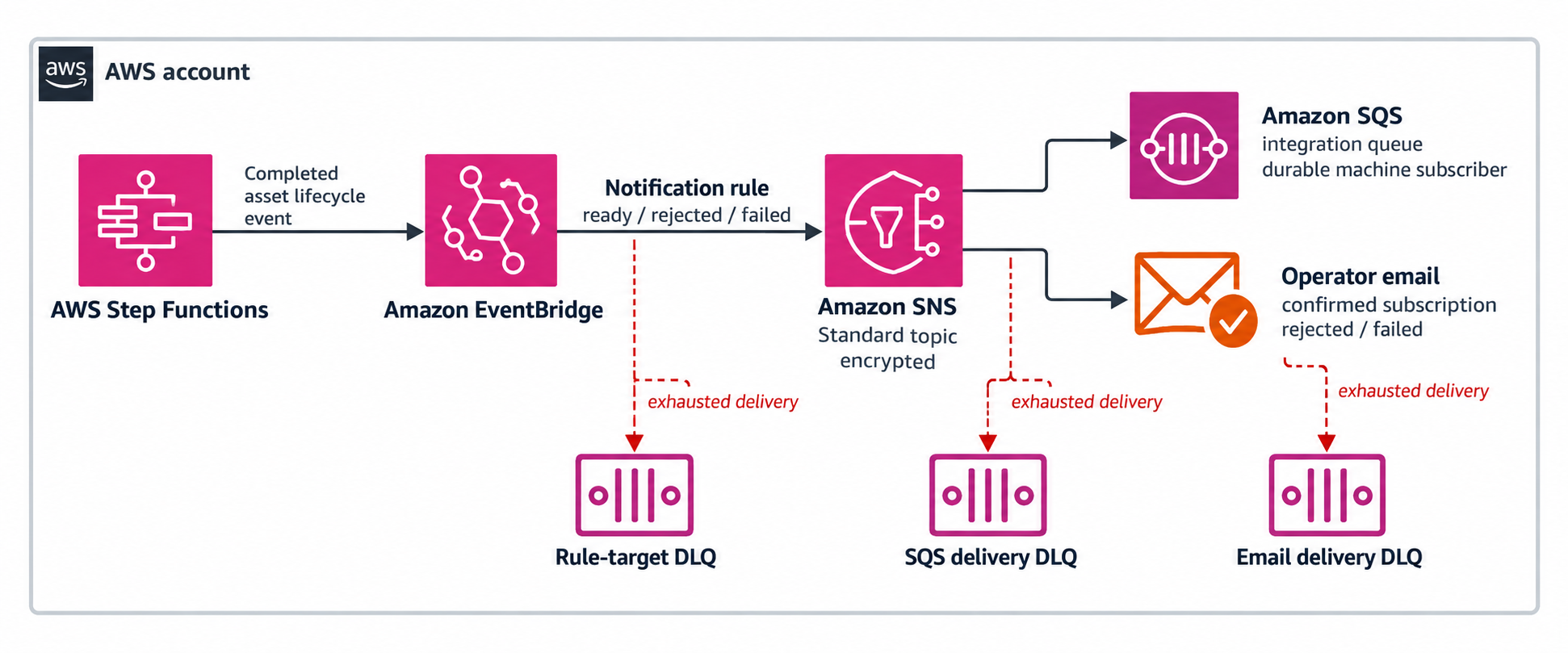
Notification fan-out and recovery flow #
The detailed flow shows routing, subscription filters, and the three delivery-recovery boundaries:
The messaging services keep distinct responsibilities:
| Component | Owns |
|---|---|
| EventBridge | Matching application events and selecting the notification topic |
| SNS | Pushing one publication independently to every matching subscription |
| SQS integration queue | Retaining a subscriber's copy until a machine consumer is ready |
EventBridge can already send one event to several rule targets. That is enough when each target is part of event routing and has its own event pattern. SNS earns its place when the useful abstraction is a named channel with independently managed push subscriptions: publish once, then let each subscriber choose a protocol and filter.
The existing SQS admission queue continues to buffer work before the asset workflow. The new integration queue holds one subscriber's copy after processing reaches a terminal state. Together, the two queues protect different stages of the asset lifecycle.
A Standard topic #
Use a Standard topic because the notification path values broad protocol support and independent fan-out over strict ordering. Standard topics provide at-least-once delivery and can occasionally deliver a duplicate or a later event before an earlier one.
That is acceptable here. DynamoDB remains the source of current state, and consumers already need idempotency because the EventBridge path is at-least-once. A consumer should use assetId, status, and schemaVersion as its logical identity and confirm current state before making a non-repeatable decision.
An SNS FIFO topic serves workloads that centre on ordered, deduplicated delivery to SQS subscribers. This operator-notification channel benefits more from the Standard topic's broader endpoint support and simpler publication contract.
Encrypt the topic #
SNS topic encryption uses KMS. Create a customer managed key so EventBridge can receive the exact cryptographic permissions it needs:
const notificationKey = new kms.Key(this, 'AssetNotificationKey', {
  enableKeyRotation: true,
  pendingWindow: cdk.Duration.days(7),
  removalPolicy: cleanupPolicy,
});

notificationKey.addToResourcePolicy(new iam.PolicyStatement({
  principals: [new iam.ServicePrincipal('events.amazonaws.com')],
  actions: ['kms:Decrypt', 'kms:GenerateDataKey'],
  resources: ['*'],
}));

const notificationTopic = new sns.Topic(this, 'AssetNotificationTopic', {
  displayName: 'Asset lifecycle notifications',
  masterKey: notificationKey,
});
The Resource: '*' sits inside this key's resource policy, so it refers to this key. AWS requires the EventBridge-to-encrypted-topic KMS statement in this form because these calls do not support aws:SourceArn or aws:SourceAccount conditions. The topic policy provides the complementary scope by limiting sns:Publish to this topic.
The event contract carries stable identifiers and safe metadata. User identity, credentials, presigned URLs, and raw exceptions stay within the services that own them. This compact contract remains appropriate as notifications reach subscribers, queue readers, email systems, logs, and dead-letter queues.
A customer managed key adds a monthly key charge and KMS API charges. A disposable preview with a confirmed non-sensitive contract can adopt an explicit unencrypted-topic policy when minimizing fixed cost is the priority. Production keeps customer-controlled encryption as its intentional default.
Route events to SNS #
Create a second rule on the existing custom bus. The audit rule keeps its CloudWatch Logs target; this notification rule has its own lifecycle and target policy:
const notificationRule = new events.Rule(this, 'AssetNotificationRule', {
  eventBus: lifecycleBus,
  description: 'Fan out terminal asset events to notification subscribers',
  eventPattern: {
    source: ['com.example.assets'],
    detailType: ['Asset State Changed'],
    detail: { status: ['ready', 'rejected', 'failed'] },
  },
});
Matching the three known statuses makes the boundary explicit. When a future quarantined status arrives, the channel owner can review its audience and add it intentionally to the notification pattern.
Give the EventBridge target its own DLQ:
const notificationRuleDeliveryDeadLetterQueue = new sqs.Queue(
  this,
  'NotificationRuleDeliveryDeadLetterQueue',
  {
    encryption: sqs.QueueEncryption.SQS_MANAGED,
    retentionPeriod: cdk.Duration.days(14),
  },
);

notificationRule.addTarget(new targets.SnsTopic(notificationTopic, {
  deadLetterQueue: notificationRuleDeliveryDeadLetterQueue,
  maxEventAge: cdk.Duration.hours(24),
  retryAttempts: 185,
}));
The target sends the complete EventBridge envelope as the SNS message body. CDK adds a topic resource policy that permits the EventBridge service to publish to this topic. The state machine remains focused on the event bus, while the rule and topic own SNS permissions and subscriber configuration.
The two rule-target DLQs preserve precise recovery context. The audit DLQ holds deliveries intended for CloudWatch Logs, while the notification DLQ holds deliveries intended for the SNS channel.
Add a durable subscriber #
The first SNS subscriber is an SQS queue. It represents a machine integration that may be deployed, paused, or scaled independently:
const integrationQueue = new sqs.Queue(this, 'AssetNotificationIntegrationQueue', {
  encryption: sqs.QueueEncryption.SQS_MANAGED,
  retentionPeriod: cdk.Duration.days(4),
});

const integrationDeliveryDeadLetterQueue = new sqs.Queue(
  this,
  'IntegrationSubscriptionDeadLetterQueue',
  {
    encryption: sqs.QueueEncryption.SQS_MANAGED,
    retentionPeriod: cdk.Duration.days(14),
  },
);

notificationTopic.addSubscription(new subscriptions.SqsSubscription(
  integrationQueue,
  {
    rawMessageDelivery: true,
    deadLetterQueue: integrationDeliveryDeadLetterQueue,
  },
));
With raw delivery enabled, the SQS body contains the EventBridge JSON directly. Consumers receive the usual SQS metadata and parse the event body once.
CDK adds the queue resource policy that grants this topic permission to call sqs:SendMessage. The subscription DLQ preserves a publication after SNS exhausts delivery attempts to the integration queue.
The integration queue begins as an observable, durable endpoint for this chapter. A future consumer can add a processing DLQ and a visibility timeout tailored to its behavior. The subscription DLQ then covers SNS delivery, while the consumer DLQ covers processing after SQS accepts the message.
Add an operator email #
Email endpoints require a real address and an out-of-band confirmation, so make the subscription opt-in through CDK context:
const notificationEmail = this.node.tryGetContext('notificationEmail');
let emailDeliveryDeadLetterQueue: sqs.Queue | undefined;
if (notificationEmail) {
  emailDeliveryDeadLetterQueue = new sqs.Queue(
    this,
    'EmailSubscriptionDeadLetterQueue',
    {
      encryption: sqs.QueueEncryption.SQS_MANAGED,
      retentionPeriod: cdk.Duration.days(14),
    },
  );
  notificationTopic.addSubscription(new subscriptions.EmailSubscription(
    String(notificationEmail),
    {
      json: true,
      deadLetterQueue: emailDeliveryDeadLetterQueue,
      filterPolicyWithMessageBody: {
        detail: sns.FilterOrPolicy.policy({
          status: sns.FilterOrPolicy.filter(
            sns.SubscriptionFilter.stringFilter({
              allowlist: ['rejected', 'failed'],
            }),
          ),
        }),
      },
    },
  ));
}
The SQS subscriber receives all three statuses. The email subscriber uses a payload-based filter against the nested EventBridge message body and selects rejected and failed. Payload filtering fits this integration because EventBridge publishes the fields in the message body; attribute filtering serves publishers that provide SNS message attributes.
json: true uses the email-json protocol, which includes the notification metadata and full message. This gives an operator a structured event for diagnosis. Customer-facing email can build on a dedicated rendering service, unsubscribe policy, localization, and a provider such as Amazon SES.
Deployment creates the subscription in PendingConfirmation. The recipient activates delivery through the confirmation link. From that point, new matching notifications reach the address; the SQS subscription provides the durable record throughout the process.
Passing an email address through context places it in the synthesized CloudFormation template. Treat the template and SNS subscription as account data, and use a dedicated operator address for this channel.
Delivery recovery boundaries #
Three independently recoverable delivery boundaries follow publication:
| Hand-off | Recovery owner | Retained in |
|---|---|---|
| EventBridge → SNS publication | Notification rule target | NotificationRuleDeliveryDeadLetterQueue |
| SNS → SQS delivery | SQS subscription | IntegrationSubscriptionDeadLetterQueue |
| SNS → confirmed email delivery | Email subscription | EmailSubscriptionDeadLetterQueue |
Separate queues preserve the recovery instruction for every message. An operator can immediately identify whether a redrive belongs to an EventBridge target invocation or an SNS subscription.
SNS gives AWS-managed endpoints such as SQS an extended retry schedule and applies its email-specific policy to the operator channel. Each DLQ turns an exhausted delivery into retained, inspectable work.
Infrastructure tests #
Add a synthesis test with an email context value so both subscription shapes exist in the template:
const env = { account: '111111111111', region: 'us-east-1' };

test('fans terminal lifecycle events out to durable and filtered subscribers', () => {
  const app = new App({
    context: {
      pr: '123',
      acct: env.account,
      reg: env.region,
      notificationEmail: 'operator@example.com',
    },
  });
  const preview = Template.fromStack(new PreviewStack(app, 'NotificationsTest', { env }));

  preview.resourceCountIs('AWS::SNS::Topic', 1);
  preview.hasResourceProperties('AWS::SNS::Topic', {
    DisplayName: 'Asset lifecycle notifications',
    KmsMasterKeyId: Match.anyValue(),
  });
  preview.hasResourceProperties('AWS::KMS::Key', {
    EnableKeyRotation: true,
    KeyPolicy: {
      Statement: Match.arrayWith([Match.objectLike({
        Action: ['kms:Decrypt', 'kms:GenerateDataKey'],
        Effect: 'Allow',
        Principal: { Service: 'events.amazonaws.com' },
        Resource: '*',
      })]),
    },
  });

  preview.hasResourceProperties('AWS::Events::Rule', {
    Description: 'Fan out terminal asset events to notification subscribers',
    EventPattern: {
      source: ['com.example.assets'],
      'detail-type': ['Asset State Changed'],
      detail: { status: ['ready', 'rejected', 'failed'] },
    },
    State: 'ENABLED',
    Targets: [Match.objectLike({
      Arn: Match.anyValue(),
      DeadLetterConfig: { Arn: Match.anyValue() },
      RetryPolicy: {
        MaximumEventAgeInSeconds: 86400,
        MaximumRetryAttempts: 185,
      },
    })],
  });

  preview.hasResourceProperties('AWS::SNS::Subscription', {
    Protocol: 'sqs',
    RawMessageDelivery: true,
    RedrivePolicy: { deadLetterTargetArn: Match.anyValue() },
  });
  preview.hasResourceProperties('AWS::SNS::Subscription', {
    Protocol: 'email-json',
    Endpoint: 'operator@example.com',
    FilterPolicyScope: 'MessageBody',
    FilterPolicy: {
      detail: { status: ['rejected', 'failed'] },
    },
    RedrivePolicy: { deadLetterTargetArn: Match.anyValue() },
  });

  const outputs = preview.toJSON().Outputs;
  for (const output of [
    'AssetNotificationTopicArn',
    'AssetNotificationIntegrationQueueName',
    'AssetNotificationRuleDeadLetterQueueName',
    'AssetNotificationSqsDeadLetterQueueName',
    'AssetNotificationEmailDeadLetterQueueName',
  ]) {
    assert.ok(outputs[output], `missing ${output} stack output`);
  }
});
The reference test also synthesizes the stack without notificationEmail and verifies that only the SQS subscription remains. Run the complete suite:
npm test
Outputs #
Expose resource identifiers for verification while messages and credentials remain inside their owning services:
new cdk.CfnOutput(this, 'AssetNotificationTopicArn', {
  value: notificationTopic.topicArn,
});
new cdk.CfnOutput(this, 'AssetNotificationIntegrationQueueName', {
  value: integrationQueue.queueName,
});
new cdk.CfnOutput(this, 'AssetNotificationRuleDeadLetterQueueName', {
  value: notificationRuleDeliveryDeadLetterQueue.queueName,
});
new cdk.CfnOutput(this, 'AssetNotificationSqsDeadLetterQueueName', {
  value: integrationDeliveryDeadLetterQueue.queueName,
});
if (emailDeliveryDeadLetterQueue) {
  new cdk.CfnOutput(this, 'AssetNotificationEmailDeadLetterQueueName', {
    value: emailDeliveryDeadLetterQueue.queueName,
  });
}
The email DLQ output exists only when notificationEmail also creates the subscription and its DLQ.
Verification #
Store the operator address as the NOTIFICATION_EMAIL secret in the aws-preview GitHub environment. The preview workflow passes a non-empty secret to CDK as the notificationEmail context value. Open or synchronize a pull request, then approve its preview deployment.
After the workflow deploys the stack, set the values used by the verification commands. Use the same Region configured by the workflow's AWS_REGION variable:
PR_NUMBER=123
STACK="Stack-PR${PR_NUMBER}"
REGION=us-east-1 # Use the workflow's AWS_REGION value.
EMAIL=operator@example.com
Open the confirmation message sent to EMAIL and confirm the subscription. Then resolve the topic and integration queue:
TOPIC_ARN=$(aws cloudformation describe-stacks \
  --stack-name "$STACK" --region "$REGION" \
  --query "Stacks[0].Outputs[?OutputKey=='AssetNotificationTopicArn'].OutputValue | [0]" \
  --output text)

QUEUE_NAME=$(aws cloudformation describe-stacks \
  --stack-name "$STACK" --region "$REGION" \
  --query "Stacks[0].Outputs[?OutputKey=='AssetNotificationIntegrationQueueName'].OutputValue | [0]" \
  --output text)

QUEUE_URL=$(aws sqs get-queue-url \
  --queue-name "$QUEUE_NAME" \
  --region "$REGION" \
  --query QueueUrl \
  --output text)
Confirm both subscriptions and inspect their delivery settings:
aws sns list-subscriptions-by-topic \
  --topic-arn "$TOPIC_ARN" \
  --region "$REGION" \
  --query 'Subscriptions[].{protocol:Protocol,endpoint:Endpoint,arn:SubscriptionArn}'
After confirmation, the email subscription displays its concrete ARN.
Sign in to the preview and upload a valid image. Read the machine subscriber's copy:
aws sqs receive-message \
  --queue-url "$QUEUE_URL" \
  --max-number-of-messages 10 \
  --wait-time-seconds 10 \
  --region "$REGION" \
  --query 'Messages[].Body'
Expect an EventBridge envelope whose detail.status is ready. Raw delivery places the EventBridge event directly in the body. The email filter reserves operator messages for rejected and failed outcomes.
Upload a file whose extension declares an image while its contents use another format. The integration queue receives a rejected event and the confirmed operator address receives the JSON notification. A forced processing failure follows the same email path with status: failed.
Test the routing path directly with a diagnostic event:
EVENT_BUS=$(aws cloudformation describe-stacks \
  --stack-name "$STACK" --region "$REGION" \
  --query "Stacks[0].Outputs[?OutputKey=='AssetLifecycleEventBusName'].OutputValue | [0]" \
  --output text)

aws events put-events \
  --region "$REGION" \
  --entries "[{\"Source\":\"com.example.assets\",\"DetailType\":\"Asset State Changed\",\"Detail\":\"{\\\"schemaVersion\\\":\\\"1\\\",\\\"assetId\\\":\\\"diagnostic\\\",\\\"status\\\":\\\"rejected\\\",\\\"reason\\\":\\\"Diagnostic event\\\"}\",\"EventBusName\":\"$EVENT_BUS\"}]"
FailedEntryCount: 0 proves that EventBridge accepted the event. Receiving it from SQS and email proves the two downstream deliveries.
Finally, resolve each new DLQ output and verify ApproximateNumberOfMessages is zero. A non-zero count identifies the boundary to repair before redrive.
Delivery conditions and quotas #
- EventBridge retries topic publication within the configured 24-hour and 185-attempt bounds, then preserves an exhausted event in the rule-target DLQ.
- SNS applies its extended AWS-managed endpoint retry policy to SQS, then preserves an exhausted notification in the subscription DLQ.
- Confirmed email delivery follows the SNS email retry policy, with exhausted notifications retained in the email subscription DLQ.
- Email delivery begins after confirmation. The SQS subscription captures every publication from the start and provides the durable channel history.
- Standard topics and SQS Standard queues optimize for scale and availability with best-effort ordering. Idempotent consumers safely absorb occasional duplicates and reordering.
- Subscription filter updates can take up to 15 minutes to converge. Verification can begin after that propagation window.
- The upstream EventBridge event limit is 256 KB. This naturally keeps notifications focused on metadata while S3 stores the asset bytes.
- Publish throughput, filter policies, topics per account, and subscriptions per topic have quotas. Check Service Quotas in the deployment Region before using one topic as an unbounded integration registry.
Cost model #
SNS Standard pricing has separate dimensions for API requests and endpoint deliveries. Each 64 KB chunk counts as a request or delivery unit. SNS prices SQS and Lambda delivery at $0 per message, while data transfer and the destination service retain their own charges. Email delivery has its own rate.
This path adds one SNS publish for each matched EventBridge event, one SQS delivery for every publication, and an email delivery only for rejected or failed. EventBridge ingestion and target invocation, SQS requests and retention, and KMS key and API usage are separate charges.
For a low-volume preview, the customer managed KMS key may cost more than SNS traffic. Payload filtering also matters operationally: suppressing routine ready email avoids noise as well as delivery cost.
Cleanup #
The normal pull-request teardown removes the notification rule, topic, subscriptions, and queues, then schedules the preview KMS key for deletion:
npx cdk destroy \
  -c pr=${PR_NUMBER} \
  -c acct=${ACCOUNT_ID} \
  -c reg=${{ vars.AWS_REGION }} \
  -c repo=${GITHUB_REPOSITORY} \
  -c sha=${GITHUB_SHA} \
  -c run=${GITHUB_RUN_ID} \
  --app "npx ts-node bin/preview.ts" \
  -f
The deployed stack records its conditional resources, allowing destroy to run with the preview identifier alone. Teardown removes messages retained in its notification queues and DLQs, so export anything that should survive first. KMS then applies the configured seven-day waiting period before deleting the preview key.
A retained production key stays available until an explicit cleanup decision schedules deletion. Confirm the lifecycle of every retained topic and encrypted record before setting that schedule.
Operating model #
- Step Functions records terminal state and publishes one versioned fact to EventBridge.
- EventBridge decides whether that fact belongs in the notification channel.
- SNS owns fan-out, protocol choice, subscriber filtering, and delivery retries.
- SQS owns durable backlog after the machine subscription accepts a copy.
- Email provides prompt operator awareness; SQS and DynamoDB provide durable records.
- Every boundary has a distinct failure signal and redrive meaning.
- Subscribers can evolve independently while the workflow and event contract remain stable.
Well-Architected Framework #
- Security: the topic is encrypted with a rotating customer managed key, topic and queue policies are resource-scoped, and the event excludes identity, credentials, and internal exceptions.
- Operational Excellence: separate rule-target and subscription DLQs show exactly which hand-off failed; the integration queue provides a CLI-verifiable subscriber.
- Reliability: EventBridge and SNS retry independently, exhausted deliveries remain for 14 days, and consumers assume duplicates and reordering.
- Performance Efficiency: SNS pushes one small event to each subscriber while object bytes remain in S3 and machine consumers drain SQS at their own pace.
- Cost Optimization: payload filtering suppresses routine email, finite queue retention bounds storage, and the KMS fixed cost is explicit.
- Sustainability: one publication feeds multiple independently scaled subscribers through push delivery and shared producer work.