Image analysis
Rekognition
Day Eleven #
We can upload an image, follow its processing history, and download the accepted result. The application still knows little about what the image contains. An asset identifier and a content type cannot tell its owner that a photograph contains a tree, a bicycle, or a beach.
Today we introduce Amazon Rekognition. It supplies a managed image-analysis API, so we can attach descriptive labels without training a model or operating an inference server. Step Functions calls it inside the existing workflow, and DynamoDB stores a small summary alongside the asset record.
Rekognition owns inference. Step Functions continues to own processing state, SQS buffers admission, EventBridge routes terminal events, SNS fans out notifications, and CloudWatch observes failures. Label detection adds a processing capability without changing those boundaries.
Goal #
For each new accepted image:
- analyze the private processed S3 object with
DetectLabels; - request at most ten general labels with a minimum confidence of 80;
- store label names, confidence scores, model version, and analysis time;
- return that summary only through the existing owner-authorized status endpoint;
- mark the asset ready only after analysis and metadata persistence succeed.
This chapter changes lib/stack.ts, the transformation and completion handlers, and lambda/get-asset/index.ts. The browser already displays the status response as JSON, so its existing result panel also displays the labels. No additional endpoint or Rekognition-specific stack is needed.
Architecture and processing sequence #
High-level AWS architecture #
Rekognition sits inside the existing processing workflow. It reads a private, versioned processed object; completion stores the analysis before publishing the terminal event. The repeated S3 and DynamoDB icons represent different uses of the same bucket and table.
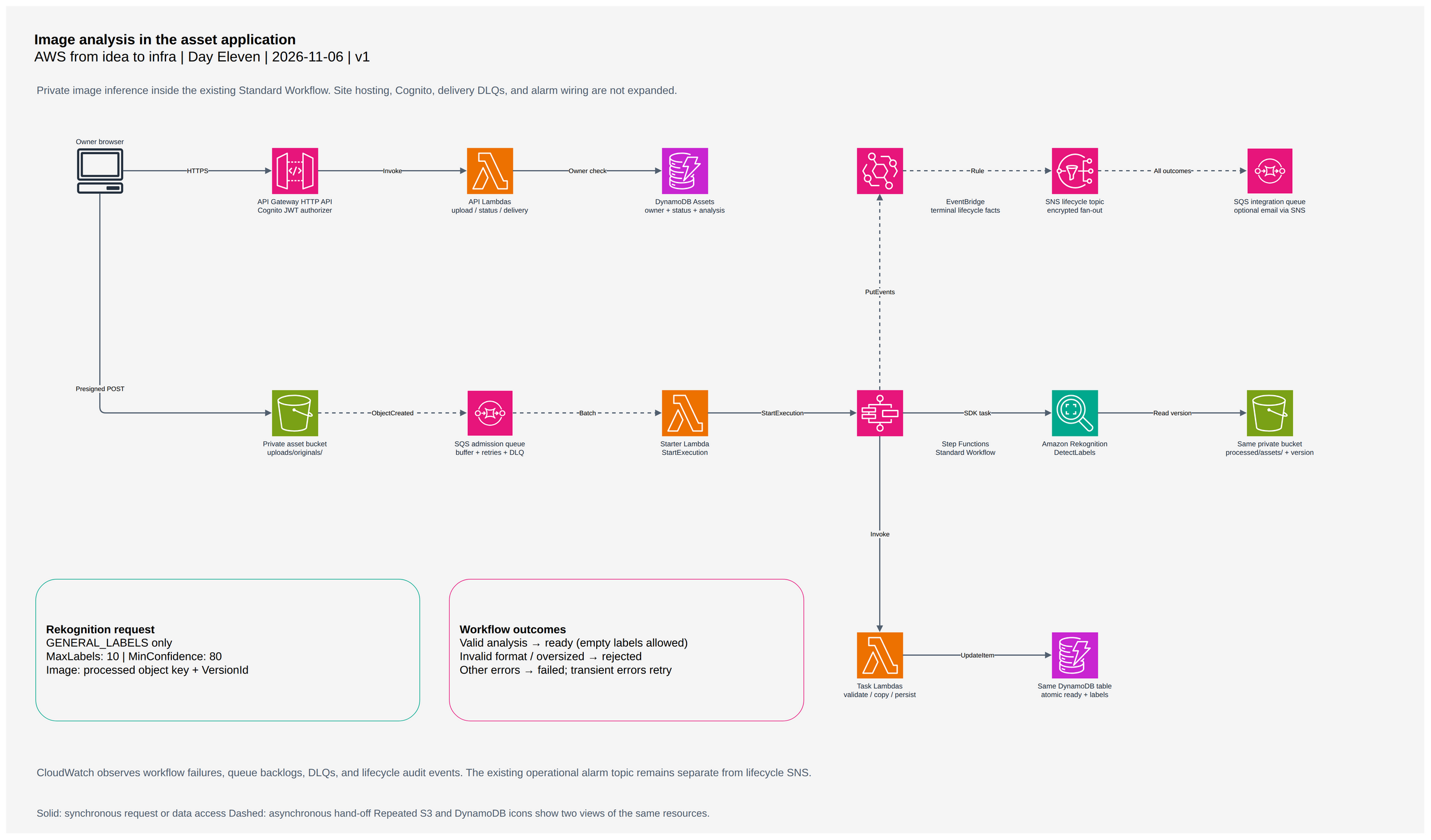

Image analysis sequence #
This sequence starts after admission to Step Functions and follows the successful processing path. Task Lambdas validate, copy, and persist; the workflow calls Rekognition directly. The status API reads the saved result and returns it only after checking ownership. The failure branches are detailed in the error-handling section below.
Open full-size sequence diagram
Choose the inference boundary #
DetectLabels identifies objects, scenes, and concepts in JPEG or PNG images. The response includes confidence scores and can include richer information such as taxonomy and object locations. We request GENERAL_LABELS and retain only the fields the application uses. We do not request the separately priced IMAGE_PROPERTIES feature. See the DetectLabels API[1].
General labels are descriptive suggestions. A score of 80 is our display threshold, not a guarantee that a classification is correct. An empty result is a valid analysis: an asset can become ready with no labels above the threshold. Do not reject it for lacking a particular object.
This is also not a moderation policy. Recognizing a person or a weapon does not establish whether an image is appropriate for a particular audience. A moderation capability would need its own service operation, policy decisions, evaluation, and review process. This chapter does not identify people or create a face collection.
For a small image gallery, user-entered tags may be sufficient. They avoid inference costs and can express meanings the model cannot infer. Rekognition becomes useful when automatic descriptions justify another network dependency and its operating cost. Keep manual descriptions if they are the source of truth for the product.
Analyze the object that processing produced #
The successful path now reads:
Validate upload → Check signature → Transform asset
  → Analyze image labels → Mark asset ready → Publish asset ready
The existing transformation is an S3 copy into processed/assets/; it does not resize or re-encode an image. That copy now returns the version identifier of the new object:
const copy = await s3.send(new CopyObjectCommand({
  Bucket: bucket,
  CopySource: `${bucket}/${encodeURIComponent(event.sourceKey)}`,
  Key: event.outputKey,
  ContentType: event.contentType,
  MetadataDirective: 'REPLACE',
}));
if (!copy.VersionId) throw new Error('Processed object has no version');
return { ...event, outputVersion: copy.VersionId };
The asset bucket is already versioned. Passing that identifier to Rekognition pins each analysis attempt to the completed copy, even if a later write creates another version at the same key. The request contains an S3 reference rather than image bytes or a presigned URL. The bucket and Rekognition must be in the same Region, and the calling role needs access to the object. AWS explains this flow in Analyzing images stored in S3[2].
This version reference is local to processing; it does not change the existing download contract, which authorizes the deterministic processed key. It also does not replace admission deduplication or make mutable source uploads immutable. The existing starter still names executions by asset identifier.
Call Rekognition directly from Step Functions #
A direct AWS SDK integration fits a single request whose inputs already exist in workflow state. There is no additional Lambda just to forward the same arguments:
const analyzeImage = new tasks.CallAwsService(this, 'Analyze image labels', {
  service: 'rekognition',
  action: 'detectLabels',
  parameters: {
    Image: { S3Object: {
      Bucket: assetBucket.bucketName,
      Name: sfn.JsonPath.stringAt('$.outputKey'),
      Version: sfn.JsonPath.stringAt('$.outputVersion'),
    } },
    Features: ['GENERAL_LABELS'],
    MaxLabels: 10,
    MinConfidence: 80,
  },
  iamAction: 'rekognition:DetectLabels',
  iamResources: ['*'], // DetectLabels does not support resource-level permissions.
  resultSelector: {
    'labels.$': '$.Labels',
    'modelVersion.$': '$.LabelModelVersion',
  },
  resultPath: '$.analysis',
  taskTimeout: sfn.Timeout.duration(cdk.Duration.seconds(30)),
});
resultPath preserves the asset identity and output key while adding the analysis. Replacing the entire state with the service response would lose the fields needed by completion and lifecycle publication. The task uses the request-response integration, not a callback or a video-analysis job.
CallAwsService grants the workflow role rekognition:DetectLabels. That operation requires the wildcard resource because it has no resource ARN to scope. This does not grant all Rekognition actions. Add S3 access separately after creating assetWorkflow:
assetWorkflow.addToRolePolicy(new iam.PolicyStatement({
  actions: ['s3:GetObjectVersion'],
  resources: [assetBucket.arnForObjects('processed/assets/*')],
}));
Only the workflow role gains inference access, and its additional object read permission covers processed versions. The browser, public API handler, and workflow starter receive no Rekognition permissions. The existing S3-managed encryption and public-access block remain in use; no public bucket policy or new KMS key is required.
Separate image rejection from service failure #
A magic-byte check is useful early validation, but a file can have a PNG signature and still be undecodable. Rekognition provides another opportunity to detect that failure. The workflow handles errors at the task boundary:
| Outcome | Action | Asset result |
|---|---|---|
| Labels returned, including an empty list | Persist summary, then publish ready | ready |
InvalidImageFormatException or ImageTooLargeException |
Add a stable reason and use the existing rejection branch | rejected |
| Throttling, provisioned throughput exhaustion, or internal service error | Retry with backoff and jitter | Continue on recovery; otherwise failed |
| Access denied, inaccessible S3 object, or another task failure | Record an operational failure | failed |
An inaccessible object can mean broken IAM or a deleted version. Treating it as an invalid user image would hide an infrastructure problem. Likewise, we do not publish ready when the inference service is unavailable.
The transient retry policy is explicit:
analyzeImage.addRetry({
  errors: [
    'Rekognition.ThrottlingException',
    'Rekognition.ProvisionedThroughputExceededException',
    'Rekognition.InternalServerErrorException',
  ],
  interval: cdk.Duration.seconds(2),
  backoffRate: 2,
  maxAttempts: 3,
  jitterStrategy: sfn.JitterType.FULL,
});
There can be one initial call and up to three retries. The task has a 30-second timeout, within the existing five-minute workflow timeout. Step Functions SDK errors use the Rekognition prefix and an Exception suffix, including for the API's InternalServerError. See AWS SDK integration error conventions[3].
The invalid-image catcher runs before the general failure catcher. It writes a safe explanation at $.reason and enters Reject invalid asset, which updates DynamoDB and publishes the existing rejected event. Other errors enter Record processing failure and the failed terminal path. Catchers preserve the remaining input with resultPath: '$.failure'.
The existing failure and timeout alarms therefore cover this additional dependency. Rejected images still finish through Succeed and appear in audit events instead of increasing workflow failure counts. SNS continues to send the filtered rejection or failure notification when email is configured.
Persist a small, private result #
complete-asset now requires an analysis result. It normalizes at most ten labels into { name, confidence } pairs and rejects malformed scores. It writes analysis, outputKey, and status: ready in the same DynamoDB update. Retrying completion replaces this summary; it does not append duplicate labels.
An illustrative status response contains:
{
  "asset": {
    "assetId": "YOUR_ASSET_ID",
    "status": "ready",
    "contentType": "image/jpeg",
    "analysis": {
      "service": "rekognition",
      "modelVersion": "MODEL_VERSION_RETURNED_BY_SERVICE",
      "minConfidence": 80,
      "labels": [{ "name": "Tree", "confidence": 98.2 }],
      "analyzedAt": "2026-11-06T00:00:00.000Z"
    }
  }
}
Actual labels and scores depend on the image and service model. Retaining the model version makes differences between analyses easier to investigate. analyzedAt is the completion handler's timestamp, so a completion retry can update it; it is not a timestamp issued by the inference service.
The status handler checks Cognito ownership before constructing this response. Other owners still receive 404. It includes analysis only for ready assets, and old ready records without analysis remain readable. Deploying this chapter does not backfill earlier uploads.
Do not put inferred labels into lifecycle events merely because they are available. The existing events remain unchanged, so email, the integration queue, and the audit stream do not gain private descriptive metadata. Execution history still contains inference inputs and results; workflow error logs may contain state as well. Restrict operator access to those records, avoid logging tokens or signed URLs, and use appropriate images for your account's data-processing policies. The workflow log group retains the existing seven-day preview or one-month production policy; execution history has its own service retention.
Deploy and verify #
Run these commands from the aws-from-idea-to-infra source project at the repository root. The shared AssetSeriesAuth stack must already exist in the same account and Region. Use a Region that supports Rekognition:
npm test
PR_NUMBER=123
STACK="Stack-PR${PR_NUMBER}"
REGION=us-east-1
export AWS_PROFILE=dev
export AWS_REGION="$REGION"

npx cdk deploy "$STACK" \
  --app "npx ts-node bin/preview.ts" \
  -c pr="$PR_NUMBER" \
  --outputs-file cdk-outputs.json
Preserve your existing notificationEmail context value if the preview uses operator email. The GitHub preview deployment also picks up this workflow change.
Open PreviewUrl, sign in, and upload a real PNG or JPEG photograph within the existing five-MiB upload limit. Inspect analysis.labels in the result panel and verify the private download still works. A simple image may return no labels; that should still reach ready.
Resolve the workflow and table using their existing outputs:
WORKFLOW=$(aws cloudformation describe-stacks --stack-name "$STACK" \
  --query "Stacks[0].Outputs[?OutputKey=='AssetWorkflowArn'].OutputValue | [0]" \
  --output text)
TABLE=$(aws cloudformation describe-stacks --stack-name "$STACK" \
  --query "Stacks[0].Outputs[?OutputKey=='AssetsTableName'].OutputValue | [0]" \
  --output text)

aws stepfunctions list-executions --state-machine-arn "$WORKFLOW" --max-results 10

ASSET_ID=YOUR_ASSET_ID
aws dynamodb get-item --table-name "$TABLE" --consistent-read \
  --key "{\"assetId\":{\"S\":\"$ASSET_ID\"}}" \
  --projection-expression 'assetId, #s, analysis' \
  --expression-attribute-names '{"#s":"status"}'
In the execution graph, inspect Analyze image labels. Confirm its S3 input includes a version, its output has the model version and labels, and completion follows it. Then inspect the ready event in the Day Ten dashboard. Labels should appear in DynamoDB and the owner's status response, while the lifecycle event retains its earlier schema.
Check both validation boundaries in a disposable preview:
- Upload bytes that disagree with the declared content type. Signature validation should reject them before inference.
- Create a truncated PNG with its correct signature, upload it as
image/png, and inspect the Rekognition task's rejection path:
python3 - <<'PY'
from pathlib import Path
Path('/tmp/truncated.png').write_bytes(bytes.fromhex('89504e470d0a1a0a') + bytes(16))
PY
The second execution should record InvalidImageFormatException, reach rejected, and leave the workflow failure alarm clear. The original rejection handler adds a delete marker; with versioning enabled, this does not immediately erase historical bytes. A processed copy made before inference can also remain private after rejection. No download URL is issued for rejected assets.
Using a second test user, request the first user's asset through the authenticated status endpoint and confirm 404. For a service failure, inspect the failed execution history and the workflow alarm rather than treating a missing label as evidence of an outage. Do not generate a throttling burst just to test retries.
tests/rekognition.test.ts verifies workflow ordering, versioned input, inference parameters, retry and catch paths, IAM scope, compact result handling, empty labels, and owner-only responses. These local tests synthesize infrastructure and mock metadata reads; they do not call Rekognition. Live verification establishes actual service access and image decoding.
Quotas, cost, and cleanup #
The application still limits uploads to five MiB. Rekognition's S3 input limit is 15 MB; supported dimensions for DetectLabels range from 80 pixels on each side to 10,000 pixels on each side. The file-size cap alone cannot establish that an image meets those requirements. Review the current image limits and regional throughput quotas[4] before deployment.
Retries absorb short disruptions; they cannot solve sustained overload. Multiple previews share account and Region throughput. Admission may remain healthy while executions fail on inference capacity. Watch workflow failures and execution history, then consider a lower admission rate or a quota increase if measured demand requires it. Do not expand retries indefinitely.
Rekognition Image charges by analysis API usage, with volume tiers and regional pricing. General label detection is a Group 2 operation; requesting image properties would add a separate charge. Each new image now adds an inference request plus workflow transitions, S3 access, and a slightly larger DynamoDB record. Retries, manual CLI analysis, and reprocessing can add usage. A smaller MaxLabels bounds our result, but does not turn a request into a fraction of an analyzed image. Check Rekognition pricing[5] for your Region and account allowances.
There is no model endpoint or collection to delete. Normal preview teardown removes the workflow, preview data, queues, and log groups according to their existing policies:
npx cdk destroy "$STACK" \
  --app "npx ts-node bin/preview.ts" \
  -c pr="$PR_NUMBER"
Export evidence first if investigating a failure. Production retains its asset bucket and table, including saved analysis and historical object versions, under the existing retention policies. Stack deletion does not reverse inference charges or remove retained data. Shared Cognito users remain available for the next preview.
Well-Architected Framework #
- Operational Excellence: execution history shows inference separately from copying and persistence.
- Security: version-scoped private object access and owner checks protect images and inferred metadata.
- Reliability: bounded retries distinguish temporary service faults from rejected input.
- Performance Efficiency: direct integration avoids an extra forwarding Lambda and passes S3 references instead of image bytes.
- Cost Optimization: one requested feature and a small summary keep usage and storage reviewable.
- Sustainability: managed inference avoids maintaining an idle application inference server.
Source code #
Reference implementation (opens in a new tab)