Edge and API protection
AWS WAF
Day Twelve #
The application can authenticate an owner, process an image, and explain a failure. Its public endpoints still accept requests before the application knows whether the caller is useful or hostile. Invalid tokens do not stop someone sending large numbers of requests, and ownership checks do not identify malicious request patterns.
Today we introduce AWS WAF. It evaluates HTTP requests at the website and API entry points, blocking matching requests before they reach the origin or application handler. Cognito still identifies callers, and the asset Lambdas still decide whether a caller owns an asset. Passing a firewall rule is not permission to read somebody else's image.
This chapter adds lib/web-protection.ts, migrates API Gateway to a regional REST API, and updates the existing preview workflows. The cumulative source is in the existing aws-from-idea-to-infra reference repository, checked out at the root of the notes workspace.
Goal #
For each preview:
- inspect website and API requests with separate web ACLs;
- apply AWS managed rules and a per-IP rate rule;
- protect the API's direct endpoint without requiring a domain;
- preserve the current preview's Cognito client and owner checks;
- retain blocked-request evidence without recording tokens or sign-in query strings;
- keep deployment and teardown in the existing CI/CD workflows.
Follow the two public request paths #
Loading the page and calling its API are separate requests. The browser first asks CloudFront for the site. The CloudFront web ACL evaluates that request before CloudFront returns a cached response or reads the private site bucket. Blocking here prevents that page request from reaching its origin; it does not disable the separate API endpoint.
After loading site/config.js, the browser calls the generated API URL directly. Its regional web ACL evaluates the API request before API Gateway's Cognito authorizer. If WAF permits it, API Gateway verifies the ID token, then invokes the relevant Lambda. The handler checks the asset's owner in DynamoDB before returning metadata or issuing a download grant. A valid user's request can still be blocked by WAF; a request allowed by WAF can still fail authentication or ownership checks. AWS documents this ordering for REST APIs[1].
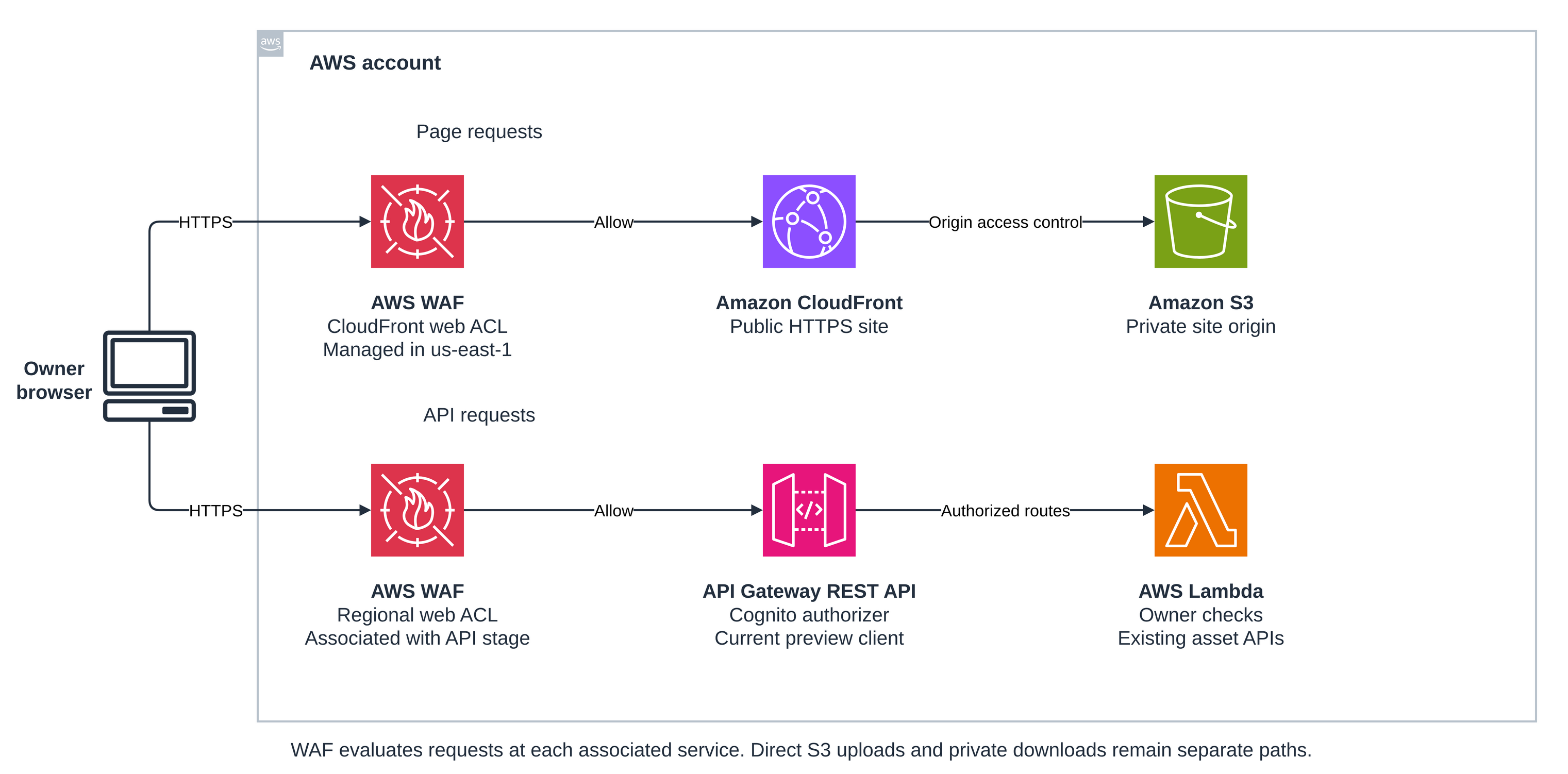
The WAF icons show evaluation boundaries. Each web ACL is associated with the service beside it. The CloudFront-scoped ACL is managed in us-east-1; the regional ACL lives alongside the API. A CloudFront ACL cannot also be attached to that API stage[2].
File bytes still travel directly between the browser and private S3 using signed upload forms and download URLs. Those requests do not pass through either web ACL. Their controls remain the signed policy, IAM, private storage, the application file-size cap, and processing validation. The Cognito hosted UI is also outside these two associations. Protecting these surfaces does not place WAF around every service in the account.
Once an upload enters SQS, the existing workflow continues: validate, copy, analyze the processed version with Rekognition, persist ready state and labels, then publish a terminal event. EventBridge routing, SNS fan-out, and their recovery queues do not participate in deciding whether an incoming HTTP request passes WAF.
Choose the protection boundary #
For a small internal tool, authentication, validation, and API throttling may be enough. WAF becomes useful when public request patterns need centrally managed inspection and filtering before application code runs. It adds policy management, false positives, and recurring cost; it does not replace those application controls.
Our HTTP API cannot accept the regional web ACL association used here. We migrate to a regional REST API so the API stage itself is protected. Merely putting WAF on the website's CloudFront distribution would leave callers free to use the API URL directly. A proxy design would also need to prevent bypass through that origin; a protected REST stage makes the boundary explicit without a custom domain.
The routes remain GET /hello, POST /assets, GET /assets/{assetId}, and POST /assets/{assetId}/delivery. The new base URL includes /preview. The existing post-deployment configuration step reads AssetApiBaseUrl, so the browser learns the new address without hard-coding it.
Migrate authentication with the API #
Create the REST API with the preview's exact site origin and modest stage throttles:
const api = new apigw.RestApi(this, 'PreviewRestApi', {
  endpointTypes: [apigw.EndpointType.REGIONAL],
  defaultCorsPreflightOptions: {
    allowHeaders: ['Authorization', 'Content-Type'],
    allowMethods: ['GET', 'POST', 'OPTIONS'],
    allowOrigins: [previewOrigin],
  },
  deployOptions: {
    stageName: 'preview', metricsEnabled: true,
    throttlingRateLimit: 50, throttlingBurstLimit: 100,
    dataTraceEnabled: false,
  },
});
Preflight OPTIONS methods remain unauthenticated so the browser can ask permission to send its authorization header. Actual asset methods use a Cognito authorizer. The three proxy handlers now read requestContext.authorizer.claims.sub, replacing the HTTP API's authorizer.jwt.claims.sub shape. Changing only the CDK API resource would leave authenticated owners unable to use the application.
The shared pool contains users for every preview. Checking the pool alone would admit an ID token issued for another preview app client. Restrict its aud to this client:
const userAuthorizer = new apigw.CognitoUserPoolsAuthorizer(this, 'UserAuthorizer', {
  cognitoUserPools: [users],
});
(userAuthorizer.node.defaultChild as apigw.CfnAuthorizer).identityValidationExpression =
  cdk.Fn.join('', ['^', webClient.userPoolClientId, '$']);

const authenticated = {
  authorizer: userAuthorizer,
  authorizationType: apigw.AuthorizationType.COGNITO,
};
The browser continues to send its existing ID token. With no method OAuth scopes, the REST authorizer validates identity tokens; the expression checks their audience. Access tokens follow a different scope-based contract and are not a substitute for this configuration[3]. DynamoDB ownership checks still run after authentication.
REST Lambda proxy responses must include their own CORS headers. The stack sets ALLOWED_ORIGIN on the API handlers, and their replies use it on success and application errors. API Gateway's default client/server error responses receive the same origin so rejected authentication is visible to the page. WAF-generated block responses can still appear as a generic cross-origin failure in the browser; use a direct CLI request and WAF logs to diagnose them. Do not relax authorization to resolve a browser CORS message.
Put each web ACL in the right place #
Constructing the application stack also defines a companion Stack-PR<number>-Edge stack in us-east-1. It owns the CloudFront web ACL and its logs. The application stack stays in AWS_REGION and enables CDK cross-region references to consume the edge ACL ARN. When the application already runs in us-east-1, the stacks remain separate but share the Region.
const edge = new EdgeProtectionStack(scope, `${id}-Edge`, {
  env: { account: this.account, region: 'us-east-1' },
  crossRegionReferences: true, isPreview,
});
The existing distribution sets webAclId: edge.protection.acl.attrArn. CloudFront uses that distribution property rather than CfnWebACLAssociation. We also remove the old 403-to-200 fallback so a firewall denial is not presented as a successful page load. WAF and origin errors can otherwise share CloudFront's custom error handling[7].
The regional ACL attaches to the deployed REST stage:
const apiProtection = new WebProtection(this, 'ApiProtection', {
  scope: 'REGIONAL', isPreview,
});
const association = new waf.CfnWebACLAssociation(this, 'ApiWebAclAssociation', {
  resourceArn: api.deploymentStage.stageArn,
  webAclArn: apiProtection.acl.attrArn,
});
association.node.addDependency(api.deploymentStage);
This stage association protects the default execute-api URL too. It does not depend on the caller first visiting the site, sending a secret origin header, or using a particular hostname.
Both target Regions must already be bootstrapped for CDK, and the deployment identity needs access to their bootstrap roles. This extends the existing account setup; it does not create another application release process. CDK's cross-region reference helpers use CloudFormation custom resources to carry the edge ARN and record the stack dependency. CDK currently marks this feature experimental, so keep the pinned dependency versions and test both regional layouts when upgrading[9].
The two reference workflows use --all with the existing preview entrypoint. CI deploys the edge dependency before the application and removes the application before its edge stack. The auth stack is outside this assembly and survives preview teardown. The workflow still reads outputs from Stack-PR<number> to generate site/config.js and comment the current URLs.
Inspect patterns and limit bursts #
WebProtection defines the same policy for both scopes. Its default action is allow. Rules run in ascending priority: the rate rule blocks an over-limit IP, then the Common Rule Set and Known Bad Inputs evaluate requests using their managed actions.
{
  name: 'PerIpRateLimit', priority: 0, action: { block: {} },
  statement: { rateBasedStatement: {
    aggregateKeyType: 'IP', limit: 2000, evaluationWindowSec: 300,
  } },
  visibilityConfig: visibility('PerIpRateLimit'),
}
This is an estimated per-IP rate over five minutes, independently counted by each ACL. It is not an exact request allowance, a per-user budget, or a cap on inference spending. Several users behind a shared NAT can share a counter, while a distributed caller can use several IPs. We use the service-observed client IP rather than trusting a caller-supplied forwarding header. Evaluation and propagation take time, and changing rate settings resets tracking[5]. REST stage throttles provide another request-rate control, also with best-effort enforcement.
The two managed groups are AWSManagedRulesCommonRuleSet and AWSManagedRulesKnownBadInputsRuleSet, with overrideAction: { none: {} }. Common rules include missing user-agent headers, suspicious inputs, and body-size checks. They are request heuristics, so a block is evidence of a policy match rather than proof of an attack[4].
Body inspection has a finite limit. The default inspected body size for these integrations is 16 KB, while the Common Rule Set's SizeRestrictions_BODY blocks above 8 KB. Our API receives small JSON metadata; the five-MiB image travels directly to S3. Putting that image in the API request would change this design, not merely require raising a Lambda timeout.
These managed groups use their default versions. AWS can update that version independently of application code. Exercise sign-in, upload creation, status polling, and delivery in a preview before promotion. For a false positive, inspect the specific terminating rule and consider a narrowly scoped exception or a temporary rule-action override to Count. Count records a match but permits evaluation to continue; a later rule can still block. Preserve protection on unrelated inputs rather than disabling an entire group. The logging filter below retains Count observations for that investigation.
Keep useful evidence without sign-in secrets #
Each ACL publishes metrics under a stack-specific prefix and writes selected requests to its own aws-waf-logs-* CloudWatch log group. Sampling is disabled in both the web ACL and every rule. Logging keeps Block and Count records and drops routine allowed traffic, so log volume focuses on policy decisions.
CloudFront also sees the Cognito callback's query string. Logging that query could retain an authorization code even though the token exchange happens elsewhere. The web ACL therefore applies data protection before records are stored:
dataProtectionConfig: {
  dataProtections: [
    { field: { fieldType: 'SINGLE_HEADER', fieldKeys: ['authorization', 'cookie', 'x-api-key', 'x-amz-security-token'] }, action: 'SUBSTITUTION', excludeRuleMatchDetails: true },
    { field: { fieldType: 'QUERY_STRING' }, action: 'SUBSTITUTION', excludeRuleMatchDetails: true },
    { field: { fieldType: 'BODY' }, action: 'SUBSTITUTION', excludeRuleMatchDetails: true },
  ],
},
Logging redaction additionally covers authorization, cookies, and query strings. Redaction alone does not protect sampled requests; data protection and disabled sampling address that distinction[6]. The record still contains operational metadata such as client IP, URI path, action, and rule identity. Restrict log access and keep credentials out of paths and unexpected custom headers.
Preview WAF logs retain seven days; production logs retain one month. The two scopes have separate groups in their respective Regions. Existing lifecycle audit logs answer what happened to an asset, while WAF logs answer which request was blocked. A request stopped before Lambda runs will not have a corresponding application log entry or DynamoDB state change.
Verification after CI/CD #
Use the preview created by the existing workflow. Select the same application Region and a configured read-access profile:
PR_NUMBER=123
STACK="Stack-PR${PR_NUMBER}"
EDGE_STACK="${STACK}-Edge"
REGION=us-east-1
export AWS_PROFILE=dev
export AWS_REGION="$REGION"

API_BASE=$(aws cloudformation describe-stacks \
  --stack-name "$STACK" --region "$REGION" \
  --query "Stacks[0].Outputs[?OutputKey=='AssetApiBaseUrl'].OutputValue | [0]" \
  --output text)

PREVIEW_URL=$(aws cloudformation describe-stacks \
  --stack-name "$STACK" --region "$REGION" \
  --query "Stacks[0].Outputs[?OutputKey=='PreviewUrl'].OutputValue | [0]" \
  --output text)

DISTRIBUTION_ID=$(aws cloudformation describe-stacks \
  --stack-name "$STACK" --region "$REGION" \
  --query "Stacks[0].Outputs[?OutputKey=='DistributionId'].OutputValue | [0]" \
  --output text)

STAGE_ARN=$(aws cloudformation describe-stacks \
  --stack-name "$STACK" --region "$REGION" \
  --query "Stacks[0].Outputs[?OutputKey=='ApiStageArn'].OutputValue | [0]" \
  --output text)

API_LOGS=$(aws cloudformation describe-stacks \
  --stack-name "$STACK" --region "$REGION" \
  --query "Stacks[0].Outputs[?OutputKey=='ApiWafLogGroupName'].OutputValue | [0]" \
  --output text)

EDGE_LOGS=$(aws cloudformation describe-stacks \
  --stack-name "$EDGE_STACK" --region us-east-1 \
  --query "Stacks[0].Outputs[?OutputKey=='EdgeWafLogGroupName'].OutputValue | [0]" \
  --output text)
Check the regional association and the distribution's attached ACL. Compare the returned ARNs with ApiWebAclArn and the edge stack's EdgeWebAclArn outputs:
aws wafv2 get-web-acl-for-resource --resource-arn "$STAGE_ARN" \
  --region "$REGION" --query WebACL.ARN --output text

aws cloudfront get-distribution --id "$DISTRIBUTION_ID" \
  --query Distribution.DistributionConfig.WebACLId --output text

curl --fail-with-body "$API_BASE/hello"
Normal /hello should return JSON. Verify unauthenticated asset requests are rejected, then open the preview, sign in, upload a real PNG or JPEG within five MiB, inspect its labels, and request its private download. The status and delivery paths must still deny another owner. Check that generated apiBaseUrl includes /preview; a stale HTTP API URL or old event shape is a migration failure, not a WAF exception to allow.
Check preflight independently:
SITE_ORIGIN="${PREVIEW_URL%%\?*}"
SITE_ORIGIN="${SITE_ORIGIN%/}"
curl -i -X OPTIONS "$API_BASE/assets" \
  -H "Origin: $SITE_ORIGIN" \
  -H 'Access-Control-Request-Method: POST' \
  -H 'Access-Control-Request-Headers: authorization,content-type'
Expect the exact site origin in the allow-origin response and no token requirement for preflight. An unauthorized actual request must still fail.
For a low-volume policy test, omit the user-agent header on one request to each surface:
curl -sS -o /dev/null -w '%{http_code}\n' \
  -H 'User-Agent:' "$API_BASE/hello"
curl -sS -o /dev/null -w '%{http_code}\n' \
  -H 'User-Agent:' "$PREVIEW_URL"
The current Common Rule Set should return 403 through NoUserAgent_HEADER, while the same requests with curl's normal header succeed. Wait for WAF propagation and log delivery, then inspect Block records:
aws logs filter-log-events --log-group-name "$API_LOGS" --region "$REGION" \
  --filter-pattern '{ $.action = "BLOCK" }' --limit 10 \
  --query 'events[].message' --output text

aws logs filter-log-events --log-group-name "$EDGE_LOGS" --region us-east-1 \
  --filter-pattern '{ $.action = "BLOCK" }' --limit 10 \
  --query 'events[].message' --output text
Confirm the matching rule inside ruleGroupList, the action, and the protected fields. Check each ACL's BlockedRequests metric in its WAF console view. Do not infer success from the status code alone: an API authentication failure or private S3 origin error can also deny access. No request burst is needed to test the rate rule; synthesis verifies its window, limit, and aggregation, while live traffic is monitored for its effect.
tests/web-protection.test.ts exercises both application Regions, scoped associations, deployment dependencies, managed/rate rules, log protection, CORS, and REST claims. The preceding chapters' tests still cover workflow outcomes, private delivery, notifications, monitoring, and image analysis. These tests synthesize and mock; they do not establish that AWS accepted an association or that live request inspection works.
Migration, quotas, and cost #
The REST API replaces the HTTP API, changes the base URL, and changes the Lambda event contract together. Existing buckets, tables, saved labels, workflow, and shared Cognito pool keep their roles. The first rollout can briefly expose cached old configuration while the old endpoint is being removed. CI regenerates and invalidates config.js; refresh it and retry before treating the symptom as a firewall block. This preview migration does not promise zero downtime.
Each open preview now adds two ACLs, their rules, and two log groups. WAF charges include ACLs, rules, and inspected requests, in addition to REST API, CloudFront, logs, and existing processing charges. More inspection capacity, expanded body inspection, and optional paid managed features can add costs. This implementation does not enable Bot Control, CAPTCHA, Challenge, or a paid Marketplace group. Check WAF pricing and current regional/account allowances before multiplying previews[8].
Review WAF capacity units, ACL/rule quotas, API Gateway quotas, and CloudWatch log delivery policies in both Regions. A managed-rule change can block legitimate requests; an association failure can stop rollout; rate limits can affect shared-IP users. None of these controls is a strict spending limit or a replacement for application validation and account budgets.
Closing the pull request lets CI/CD remove the application association and distribution before deleting the edge stack. Preview WAF logs follow teardown, so their retention period is a maximum while the preview exists. Production logs and asset data follow their retain policies. Removing a web ACL does not repair a rejected request, replay an upload, or refund inspection charges.
Well-Architected Framework #
- Security: both public request paths are inspected, tokens remain audience-bound, and owner authorization remains in the handlers.
- Operational Excellence: separate scoped logs identify the matching rule before an operator changes application code.
- Reliability: request filtering and rate rules reduce some abusive traffic, while false-positive testing protects legitimate use.
- Performance Efficiency: inspection happens at the entry points; image bytes keep their direct S3 path.
- Cost Optimization: focused rules, filtered logs, and automatic preview teardown keep the added footprint explicit.
- Sustainability: the design adds no always-running inspection servers or forwarding Lambda.
Source code #
Reference implementation (opens in a new tab)
References
- Protect API Gateway REST APIs with AWS WAF (opens in a new tab) · Back
- AWS WAF resource scopes and Regions (opens in a new tab) · Back
- REST API Cognito authorizers and token audience validation (opens in a new tab) · Back
- AWS managed baseline rule groups (opens in a new tab) · Back
- Rate-based rule caveats (opens in a new tab) · Back
- WAF data protection and logging (opens in a new tab) · Back
- CloudFront custom error pages with WAF (opens in a new tab) · Back
- AWS WAF pricing (opens in a new tab) · Back
- CDK cross-region references (opens in a new tab) · Back