Package the booking service
Amazon ECR
Day Fourteen #
Next we build a different application — a booking service where users browse availability and make reservations. The booking application is a persistent HTTP server with its own process lifecycle, port, and state. Those properties change how infrastructure is provisioned, deployed, and operated.
The account guardrails, GitHub OIDC federation, and CDK bootstrap established in the Private Assets series carry over without modification. The booking stack lives in the same repository as a separate CDK application with its own bin entrypoint.
Goal #
For each pull request, after approving its booking preview:
- build a minimal Node.js/TypeScript booking service and run it locally without Docker;
- package it in a multi-stage container image with a non-root runtime user;
- provision a private ECR repository with immutable image tags, scan on push, and a 10-image lifecycle rule;
- push the image to that repository and inspect the scan result;
- automate the build and push in CI/CD without long-lived AWS credentials.
Today we add booking/ and lib/booking-ecr-stack.ts to the existing repository, create an independent booking preview workflow, and add booking cleanup to the teardown workflow. The Private Assets stack continues to deploy through its own preview workflow.
Packaging and registry architecture #
GitHub Actions builds the booking image outside the AWS account. The existing OIDC trust lets the runner obtain temporary role credentials from STS. CDK uses those credentials to deploy the ECR stack through CloudFormation; Docker uses them to authenticate and push the image to the private repository.
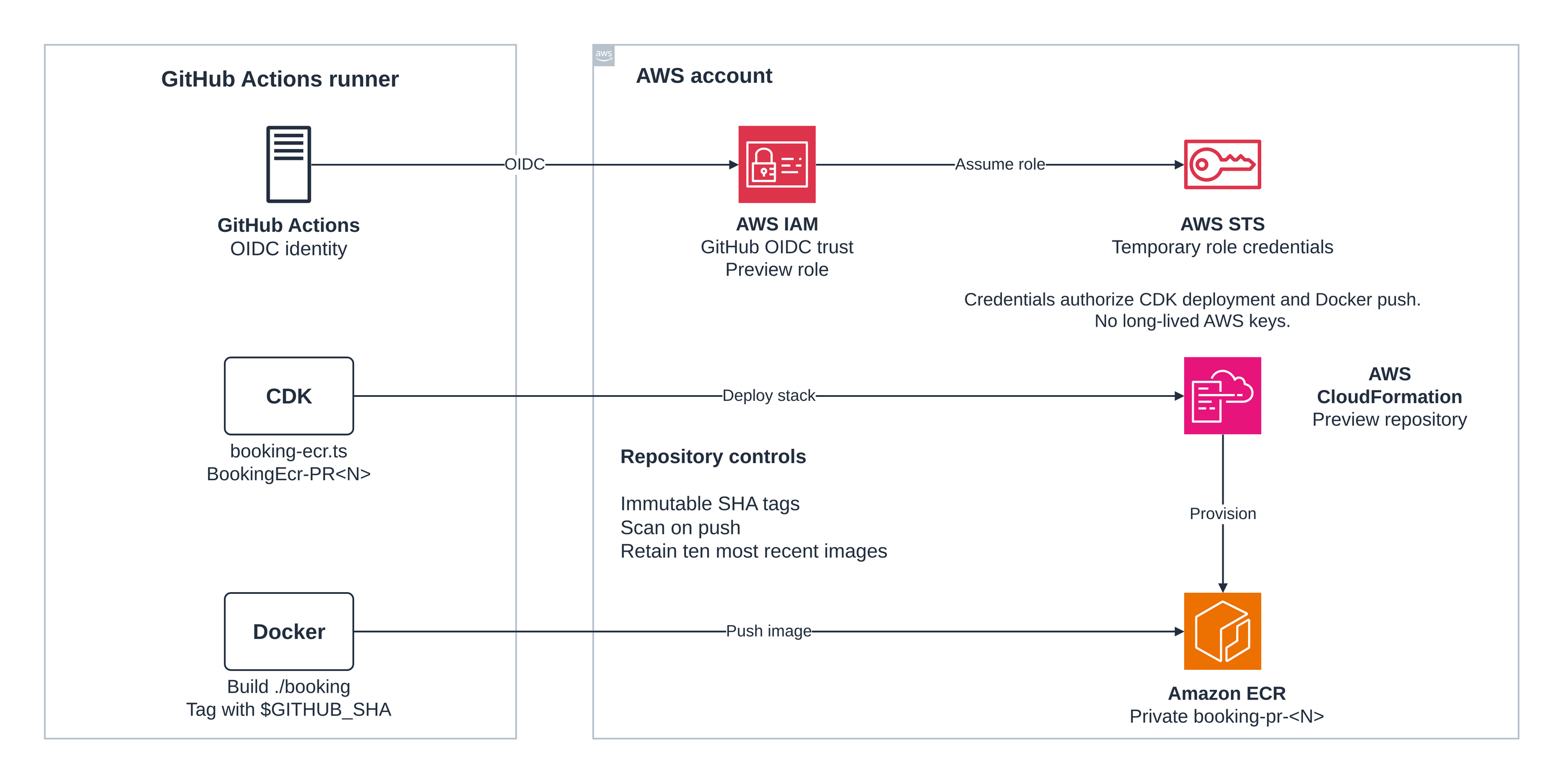
ECR stores the image; the booking service does not run in AWS yet. The VPC and ECS chapters add the infrastructure that will run it.
The booking application #
The booking service will eventually accept reservations and enforce that two users cannot hold the same slot simultaneously. For now it carries a minimal scaffold: a health check and a placeholder slots endpoint. That is enough to build, containerize, and push — and to establish the application shape.
The application uses Node's built-in http module. No framework dependency means no framework update surface in the container image, and the structure is easy to follow while the application is still small.
// booking/src/index.ts
import { createServer } from 'node:http';
import { health } from './routes/health';
import { slots } from './routes/slots';

const PORT = Number(process.env.PORT ?? 3000);

const server = createServer((req, res) => {
  const url = req.url ?? '/';
  const method = req.method ?? 'GET';

  if (method === 'GET' && url === '/health') return health(req, res);
  if (method === 'GET' && url === '/slots') return slots(req, res);

  res.writeHead(404, { 'Content-Type': 'application/json' });
  res.end(JSON.stringify({ error: 'Not found' }));
});

server.listen(PORT, () => {
  console.log(`booking service listening on port ${PORT}`);
});
Each route is a small function in its own file. The health route returns {"status":"ok"} with a 200. The slots route returns an empty JSON array — a valid, queryable response.
The application has its own package.json and tsconfig.json under booking/. It is not part of the root CDK package; its node_modules are separate. The root TypeScript configuration does not need to include booking/.
Declare typescript and the Node.js 24 @types/node definitions in the booking package's development dependencies, and commit its package-lock.json. The Docker build installs from this lockfile; it cannot rely on dependencies installed in the parent CDK project.
cd booking
npm ci
npm run build      # npx tsc → compiles to booking/dist/
node dist/index.js # booking service listening on port 3000
The server stays in the foreground. In a second terminal, verify both routes:
curl localhost:3000/health   # {"status":"ok"}
curl localhost:3000/slots    # []
Confirm those two responses before packaging. Stop the server with Ctrl+C in the first terminal to release port 3000, then return that terminal to the repository root with cd ...
Package it locally #
A multi-stage Dockerfile keeps the application's build dependencies out of the final image. The build stage compiles TypeScript; the runtime stage copies only the compiled output.
# ── Stage 1: build ────────────────────────────────────────────────────────────
FROM node:24-alpine AS builder

WORKDIR /build

COPY package.json package-lock.json tsconfig.json ./
RUN npm ci

COPY src ./src
RUN npx tsc

# ── Stage 2: runtime ──────────────────────────────────────────────────────────
FROM node:24-alpine

RUN addgroup -S appgroup && adduser -S appuser -G appgroup

WORKDIR /app

COPY --from=builder /build/dist ./dist

USER appuser

EXPOSE 3000

CMD ["node", "dist/index.js"]
The two FROM instructions define the two stages[5]. The first installs dependencies and compiles TypeScript. The second starts from the same base image, creates a non-root user, and copies only dist/ from the builder. The application's TypeScript compiler and development node_modules are left behind. The Node base image still includes npm.
A .dockerignore file at booking/.dockerignore excludes node_modules, dist, and .git from the build context, avoiding unnecessary context transfer and accidental inclusion by broader COPY instructions. The current COPY src ./src copies only src/; it does not copy the package's local node_modules or dist/ directories.
Build the image and verify both routes:
# From the repository root
docker build -t booking:local ./booking

BOOKING_CONTAINER=$(docker run --rm -d -p 127.0.0.1:3000:3000 booking:local)
curl --fail --retry 10 --retry-all-errors --retry-delay 1 \
  http://127.0.0.1:3000/health   # {"status":"ok"}
curl --fail http://127.0.0.1:3000/slots   # []

# Confirm the runtime user is not root
docker exec "$BOOKING_CONTAINER" whoami   # appuser

# Stop and remove this test container, releasing port 3000.
docker stop "$BOOKING_CONTAINER"
The health request retries while the server starts. If a request fails, inspect docker logs "$BOOKING_CONTAINER", then stop the container before repeating the test.
If whoami returns root, the USER instruction is missing or mis-ordered. Running as root inside a container is not a Docker guarantee of host isolation; it widens the attack surface if the container process can reach the host filesystem or network namespaces.
The image now has two verified routes and a non-root user. It is ready to publish. The floating node:24-alpine base tag can change between builds; pin a base-image digest when repeatable rebuilds are required, and update that digest deliberately.
Choose the registry #
A container registry stores and serves image layers. When a service like ECS starts a task, it pulls the image from the registry by its digest or tag. The registry must be reachable from the network where the task runs, and the task execution role must have permission to pull.
Amazon ECR provides a private registry per AWS account and Region. Each repository can hold many versions of an application's image — in this case, booking. The full image reference follows the pattern <account>.dkr.ecr.<region>.amazonaws.com/<repository>:<tag>. Pulling from private ECR requires both network access to its endpoints and IAM authorization. Public Docker Hub images can be pulled anonymously, subject to its usage limits, but still require network access.
Using ECR keeps the booking image in the same account and Region as the future ECS cluster. That avoids cross-Region pulls and Docker Hub pull limits, and means IAM governs who can push or pull — the same mechanism controlling every other AWS resource in the application.
ECR Basic scanning uses AWS native scanning technology to report known OS-package vulnerabilities[11]. This chapter assumes Basic scanning is enabled for the registry and configures scan on push for the booking repository. Registry-level scan filters can also control that behavior, so check them if a scan is not started. Enhanced Scanning integrates with Amazon Inspector and adds language-package coverage and continuous rescanning; it has separate charges. Basic scanning covers the OS-level findings needed for this chapter at no additional scanning charge.
Immutable image tags prevent a tag from being overwritten after it is pushed[2]. This makes sense for reproducibility: if the CI workflow tags images with the git commit SHA and pushes to an immutable repository, the same tag always refers to the same image digest. A mutable repository allows re-tagging, which makes it possible to deploy a different image under the same name without changing the tag. Using the commit SHA as the tag makes the relationship between source code and running image explicit and verifiable.
Provision ECR with CDK #
lib/booking-ecr-stack.ts provisions one repository with the properties described above. It is a standalone CDK stack with its own bin entrypoint and no cross-stack references to the Private Assets stack.
export class BookingEcrStack extends cdk.Stack {
  public readonly repository: ecr.Repository;

  constructor(scope: Construct, id: string, props?: cdk.StackProps) {
    super(scope, id, props);

    const pr = String(this.node.tryGetContext('pr') ?? 'local');
    const isPreview = pr !== 'production';
    const cleanupPolicy = isPreview ? cdk.RemovalPolicy.DESTROY : cdk.RemovalPolicy.RETAIN;

    this.repository = new ecr.Repository(this, 'BookingRepository', {
      repositoryName: `booking-pr-${pr}`,
      imageTagMutability: ecr.TagMutability.IMMUTABLE,
      imageScanOnPush: true,
      emptyOnDelete: isPreview,
      removalPolicy: cleanupPolicy,
      lifecycleRules: [
        {
          rulePriority: 1,
          description: 'Keep the 10 most recent images',
          maxImageCount: 10,
          tagStatus: ecr.TagStatus.ANY,
        },
      ],
    });

    new cdk.CfnOutput(this, 'RepositoryUri', { value: this.repository.repositoryUri });
    new cdk.CfnOutput(this, 'RepositoryName', { value: this.repository.repositoryName });
  }
}
imageTagMutability: IMMUTABLE prevents an existing tag from being reassigned to a different image digest. Attempting that replacement returns ImageTagAlreadyExistsException. Re-pushing identical content is not a replacement and may complete successfully; the tag still identifies the same image. ECR distinguishes an unchanged image from a tag conflict in its API errors[7].
The lifecycle rule selects images exceeding the ten most recent across tagged and untagged images[4]. New image versions otherwise accumulate indefinitely. Expiration is asynchronous, normally within 24 hours after images meet the criteria; this is a retention target, not an immediate ten-image cap or a storage-size limit.
emptyOnDelete: true on preview repositories lets CloudFormation empty the repository before deletion when the teardown workflow runs. A non-empty ECR repository blocks stack deletion without this flag.
The bin entrypoint names the stack BookingEcr-PR<N> for previews, mirroring the Stack-PR<N> convention we had established:
// bin/booking-ecr.ts
const app = new cdk.App();
const pr = app.node.tryGetContext('pr');
const id = pr ? `BookingEcr-PR${pr}` : 'BookingEcr';
new BookingEcrStack(app, id, { env });
Deploy it once locally using the same dev profile from the account bootstrap:
export AWS_PROFILE=dev
export AWS_REGION=us-east-1

npx cdk deploy \
  --app "npx ts-node bin/booking-ecr.ts" \
  -c pr=local \
  --require-approval never \
  --outputs-file ecr-outputs.json

REPO_URI=$(jq -r '.["BookingEcr-PRlocal"].RepositoryUri' ecr-outputs.json)
echo "$REPO_URI"
# 111111111111.dkr.ecr.us-east-1.amazonaws.com/booking-pr-local
Verify the repository properties:
REPO_NAME=$(jq -r '.["BookingEcr-PRlocal"].RepositoryName' ecr-outputs.json)

aws ecr describe-repositories --repository-names "$REPO_NAME" \
  --query 'repositories[0].{name:repositoryName,mutability:imageTagMutability,scan:imageScanningConfiguration.scanOnPush}' \
  --output table

# ------------------------------------------------
# |            DescribeRepositories              |
# +-------------+------------------+------------+
# |   mutability|      name        |    scan    |
# +-------------+------------------+------------+
# |  IMMUTABLE  | booking-pr-local |    True    |
# +-------------+------------------+------------+
Push the image #
Authenticating with ECR uses a temporary password issued by the service. The token is valid for 12 hours. Piping aws ecr get-login-password into docker login --password-stdin keeps the password out of command arguments and shell history. Docker still saves login credentials in its configured credential store or, without a helper, in its configuration file[8]:
REGION=us-east-1
ACCOUNT=$(aws sts get-caller-identity --query Account --output text)
REGISTRY="${ACCOUNT}.dkr.ecr.${REGION}.amazonaws.com"

aws ecr get-login-password --region "$REGION" \
  | docker login --username AWS --password-stdin "$REGISTRY"
# Login Succeeded
The IAM identity performing the login needs ecr:GetAuthorizationToken at the account level plus repository-scoped push permissions: ecr:BatchCheckLayerAvailability, ecr:PutImage, ecr:InitiateLayerUpload, ecr:UploadLayerPart, and ecr:CompleteLayerUpload[1]. PowerUserAccess from the account bootstrap covers both. In a production IAM configuration, scope the push permissions to the specific repository ARN and grant pull permissions separately to the ECS task execution role.
Tag and push the image. Using local-test as the tag makes the purpose clear — the CI push will use the git SHA:
docker tag booking:local "$REPO_URI:local-test"
docker push "$REPO_URI:local-test"
Inspect the result:
aws ecr describe-images \
  --repository-name "$REPO_NAME" \
  --image-ids imageTag=local-test \
  --query 'imageDetails[*].{tags:imageTags,digest:imageDigest,pushed:imagePushedAt,sizeBytes:imageSizeInBytes}' \
  --output table
describe-images reports image identity and size. Current Basic scanning does not populate its old imageScanStatus or imageScanFindingsSummary fields; use describe-image-scan-findings for scan status and results[3]. Wait for the local-test scan to finish, then inspect it:
aws ecr wait image-scan-complete \
  --repository-name "$REPO_NAME" \
  --image-id imageTag=local-test

aws ecr describe-image-scan-findings \
  --repository-name "$REPO_NAME" \
  --image-id imageTag=local-test \
  --query '{status:imageScanStatus,severityCounts:imageScanFindings.findingSeverityCounts}' \
  --output json
The CLI waiter polls for completion and exits nonzero if the scan fails or does not complete within its polling limit[10]. If it fails, run describe-image-scan-findings to inspect the status and description before proceeding. A completed scan can still report vulnerabilities; completion is not a security pass.
Review the actual findings rather than assuming a fresh base image is clean. Basic scanning does not continuously refresh stored results as new CVEs are disclosed; rebuild with updated packages or request a manual rescan when eligible. An image can receive at most one Basic scan in 24 hours, including scan on push. The CI workflow below publishes images but does not retrieve findings or enforce a vulnerability threshold.
Pulling this image and pushing it back unchanged does not test tag immutability. Docker may report success because the tag already identifies that content. The verification section below uses two different images and a temporary tag to test replacement without touching a commit-SHA tag.
Automate the push #
Opening, reopening, or updating a PR starts two independent preview workflows: infra-preview.yml runs the private-assets job, and booking-preview.yml runs booking. Both runs wait for the existing aws-preview environment approval. Approve the booking workflow to publish its image, approve Private Assets to deploy that application, or approve both. A run you leave unapproved remains pending.
GitHub reviews environment deployments within a workflow run. Separate workflows give each application its own approval while retaining the same protected environment and OIDC trust. Keep required reviewers enabled on aws-preview; the workflow files use that protection rather than configuring it. No labels are needed. Separate concurrency groups and PR comments keep the applications independent, and each job checks that the PR is still open after approval. The booking job provisions its own ECR stack before pushing and does not depend on a Private Assets deployment.
The sequence follows publication, operator verification, and PR-close cleanup. Scanning starts on push, but this workflow does not wait for scan completion or block on vulnerability findings. The operator checks the results separately.
Open full-size sequence diagram
Create .github/workflows/booking-preview.yml with this independent booking workflow. The workflow-level OIDC permission is required for the credentials action:
name: PR Preview Booking

on:
  pull_request:
    types: [opened, reopened, synchronize]

permissions:
  id-token: write
  contents: read
  issues: write
  pull-requests: write

jobs:
  booking:
    concurrency:
      group: pr-preview-booking-${{ github.event.pull_request.number }}
      cancel-in-progress: true
    if: ${{ !github.event.pull_request.head.repo.fork && vars.AWS_ROLE_ARN != '' && vars.AWS_REGION != '' && github.event.pull_request.user.login == vars.AWS_ACTOR }}
    environment: aws-preview
    runs-on: ubuntu-latest
    env:
      PR_NUMBER: ${{ github.event.pull_request.number }}
    steps:
      - uses: actions/checkout@v4
      - name: Verify PR is still open
        env:
          GH_TOKEN: ${{ github.token }}
        run: |
          PR_JSON=$(gh api "repos/${GITHUB_REPOSITORY}/pulls/${PR_NUMBER}")
          PR_STATE=$(jq -r '.state' <<< "$PR_JSON")
          if [[ "$PR_STATE" != "open" ]]; then
            echo "::error::PR ${PR_NUMBER} is ${PR_STATE}; refusing to deploy its preview stack."
            exit 1
          fi
      - uses: actions/setup-node@v4
        with:
          node-version: '24'
      - name: Install deps
        run: npm ci
      - name: Configure AWS credentials (OIDC)
        uses: aws-actions/configure-aws-credentials@v4
        with:
          aws-region: ${{ vars.AWS_REGION }}
          role-to-assume: ${{ vars.AWS_ROLE_ARN }}
          role-session-name: pr-${{ github.event.pull_request.number }}-ecr
          audience: sts.amazonaws.com
      - name: Resolve CDK env
        run: |
          ACCOUNT_ID=$(aws sts get-caller-identity --query Account --output text)
          echo "ACCOUNT_ID=$ACCOUNT_ID" >> $GITHUB_ENV
          echo "CDK_DEFAULT_ACCOUNT=$ACCOUNT_ID" >> $GITHUB_ENV
          echo "CDK_DEFAULT_REGION=${{ vars.AWS_REGION }}" >> $GITHUB_ENV
      - name: Deploy ECR stack
        run: |
          npx cdk deploy \
            -c pr=${PR_NUMBER} \
            -c acct=${ACCOUNT_ID} \
            -c reg=${{ vars.AWS_REGION }} \
            -c repo=${GITHUB_REPOSITORY} \
            -c sha=${GITHUB_SHA} \
            -c run=${GITHUB_RUN_ID} \
            --app "npx ts-node bin/booking-ecr.ts" \
            --require-approval never \
            --outputs-file ecr-outputs.json
      - name: Read ECR repository URI
        run: |
          ECR_STACK="BookingEcr-PR${PR_NUMBER}"
          REPO_URI=$(jq -r --arg stack "$ECR_STACK" '.[$stack].RepositoryUri' ecr-outputs.json)
          test -n "$REPO_URI" && test "$REPO_URI" != "null"
          echo "REPO_URI=$REPO_URI" >> $GITHUB_ENV
      - name: Authenticate with ECR
        uses: aws-actions/amazon-ecr-login@v2
      - name: Build and push booking image
        run: |
          docker build -t "$REPO_URI:$GITHUB_SHA" ./booking
          docker push "$REPO_URI:$GITHUB_SHA"
The aws-actions/amazon-ecr-login@v2 action calls ecr:GetAuthorizationToken and runs docker login automatically. No password handling is needed in the workflow steps. For a pull_request run, $GITHUB_SHA is the full 40-character SHA of GitHub's synthetic PR merge commit, which the default checkout builds[9]. It is not necessarily the latest commit on the PR's source branch. A rerun of the same merge commit reuses the tag; if a rebuild produces different content, an immutable repository rejects that replacement.
Add the following booking-destroy job under jobs in the existing infra-destroy.yml workflow. It runs independently of the Private Assets destroy job. Both attempt cleanup on PR close, including when only one preview workflow was approved:
booking-destroy:
  concurrency:
    group: pr-preview-booking-${{ github.event.pull_request.number }}
    cancel-in-progress: true
  if: ${{ !github.event.pull_request.head.repo.fork && vars.AWS_ROLE_ARN != '' && vars.AWS_REGION != '' && github.event.pull_request.user.login == vars.AWS_ACTOR }}
  environment: aws-teardown
  runs-on: ubuntu-latest
  env:
    PR_NUMBER: ${{ github.event.pull_request.number }}
  steps:
    - uses: actions/checkout@v4
    - uses: actions/setup-node@v4
      with:
        node-version: '24'
    - name: Install deps
      run: npm ci
    - name: Configure AWS credentials (OIDC)
      uses: aws-actions/configure-aws-credentials@v4
      with:
        aws-region: ${{ vars.AWS_REGION }}
        role-to-assume: ${{ vars.AWS_ROLE_ARN }}
        role-session-name: pr-${{ github.event.pull_request.number }}-ecr-destroy
        audience: sts.amazonaws.com
    - name: Resolve CDK env
      run: |
        ACCOUNT_ID=$(aws sts get-caller-identity --query Account --output text)
        echo "ACCOUNT_ID=$ACCOUNT_ID" >> $GITHUB_ENV
        echo "CDK_DEFAULT_ACCOUNT=$ACCOUNT_ID" >> $GITHUB_ENV
        echo "CDK_DEFAULT_REGION=${{ vars.AWS_REGION }}" >> $GITHUB_ENV
    - name: Destroy ECR stack
      run: |
        npx cdk destroy \
          -c pr=${PR_NUMBER} \
          -c acct=${ACCOUNT_ID} \
          -c reg=${{ vars.AWS_REGION }} \
          -c repo=${GITHUB_REPOSITORY} \
          -c sha=${GITHUB_SHA} \
          -c run=${GITHUB_RUN_ID} \
          --app "npx ts-node bin/booking-ecr.ts" \
          -f
emptyOnDelete: true on the repository means CloudFormation drains all images before deleting the repository. Without it, the destroy step fails with RepositoryNotEmptyException as soon as a push has occurred.
The private-assets and booking jobs run in separate workflows and both use the aws-preview environment, preserving the existing OIDC trust policy and giving each run its own approval. The independent destroy and booking-destroy jobs use aws-teardown for automatic cleanup. No new GitHub environments or IAM roles are needed.
Verification after CI/CD #
After approving the PR Preview Booking workflow, confirm the booking job completed and inspect the pushed image:
PR_NUMBER=123
ECR_STACK="BookingEcr-PR${PR_NUMBER}"
REGION=us-east-1
export AWS_PROFILE=dev
export AWS_REGION="$REGION"

REPO_NAME=$(aws cloudformation describe-stacks \
  --stack-name "$ECR_STACK" \
  --query "Stacks[0].Outputs[?OutputKey=='RepositoryName'].OutputValue | [0]" \
  --output text)

REPO_URI=$(aws cloudformation describe-stacks \
  --stack-name "$ECR_STACK" \
  --query "Stacks[0].Outputs[?OutputKey=='RepositoryUri'].OutputValue | [0]" \
  --output text)
List the repository's images and select the tag published by the booking workflow:
aws ecr describe-images \
  --repository-name "$REPO_NAME" \
  --query 'imageDetails[*].{tags:imageTags,digest:imageDigest,pushed:imagePushedAt}' \
  --output table
Copy the workflow's merge-commit tag from this output into IMAGE_TAG below. Use the tag from that specific run, rather than assuming the current source-branch HEAD is the image tag.
Wait for its scan and inspect the status and findings:
IMAGE_TAG='replace-with-the-image-tag-from-your-workflow-run'

aws ecr wait image-scan-complete \
  --repository-name "$REPO_NAME" \
  --image-id "imageTag=$IMAGE_TAG"

aws ecr describe-image-scan-findings \
  --repository-name "$REPO_NAME" \
  --image-id "imageTag=$IMAGE_TAG" \
  --query '{status:imageScanStatus,severityCounts:imageScanFindings.findingSeverityCounts,criticalFindings:imageScanFindings.findings[?severity==`CRITICAL`]}' \
  --output json
COMPLETE means findings are available. If the waiter exits nonzero, inspect imageScanStatus.status and imageScanStatus.description. FAILED is a general scan failure; UNSUPPORTED_IMAGE can indicate an unsupported image or OS. The description supplies the reason, rather than every failure being a manifest parsing problem. These commands assume the registry uses Basic scanning; Enhanced scanning has a different findings structure.
A critical finding does not automatically block publication in this setup. Review it before promoting the image, update affected packages or the base-image digest, and rebuild. Pinning the same vulnerable digest alone does not fix a finding. The lifecycle rule governs storage retention, not scan-gated promotion; a separate policy step would be needed to block on findings.
First confirm the deployed repository's configuration:
aws ecr describe-repositories \
  --repository-names "$REPO_NAME" \
  --query 'repositories[0].imageTagMutability' \
  --output text
# IMMUTABLE
To test enforcement, use a temporary tag and two tiny images containing different versions of a file. The COPY instruction creates a filesystem layer, which ECR requires; a scratch image containing only a LABEL has no filesystem layers and is rejected before tag immutability is checked. Changing the file changes the layer and image digest. These images test registry behavior only; they are not booking releases. ECR does not support vulnerability scanning of scratch images, so an unsupported-scan result for these probes is expected and separate from tag immutability[12]. The first push should succeed, and replacing that tag with the second image should be rejected. Keep this test separate from real commit-SHA tags so a misconfigured mutable repository cannot overwrite a release.
aws ecr get-login-password --region "$REGION" \
  | docker login --username AWS --password-stdin "${REPO_URI%%/*}"

PROBE_TAG="immutability-check-$(date +%s)"

docker build -t "$REPO_URI:$PROBE_TAG" - <<'DOCKERFILE'
# syntax=docker/dockerfile:1
FROM scratch
COPY <<FILE /probe.txt
first
FILE
DOCKERFILE
docker push "$REPO_URI:$PROBE_TAG"

BEFORE=$(aws ecr describe-images --repository-name "$REPO_NAME" \
  --image-ids imageTag="$PROBE_TAG" --query 'imageDetails[0].imageDigest' --output text)

docker build -t "$REPO_URI:$PROBE_TAG" - <<'DOCKERFILE'
# syntax=docker/dockerfile:1
FROM scratch
COPY <<FILE /probe.txt
second
FILE
DOCKERFILE
docker push "$REPO_URI:$PROBE_TAG"
# Expect a tag-immutability rejection (ImageTagAlreadyExistsException).

AFTER=$(aws ecr describe-images --repository-name "$REPO_NAME" \
  --image-ids imageTag="$PROBE_TAG" --query 'imageDetails[0].imageDigest' --output text)
test "$BEFORE" = "$AFTER"  # The original remote digest must be unchanged.

# Remove only the temporary test tag.
aws ecr batch-delete-image --repository-name "$REPO_NAME" \
  --image-ids imageTag="$PROBE_TAG"
Run the expected-failure push separately if your shell exits on errors. A network or authorization failure is not evidence of immutability: check that the rejection specifically concerns the existing immutable tag. If the second push succeeds and changes the remote digest, check that you targeted the intended account, Region, and repository, and that its tag mutability is IMMUTABLE without an exclusion for the test tag.
After the pull request closes, confirm the teardown job ran and the repository is gone:
aws ecr describe-repositories --repository-names "$REPO_NAME" 2>&1
# An error occurred (RepositoryNotFoundException)
tests/booking-ecr.test.ts synthesizes the CDK stack and verifies immutability, scan on push, the lifecycle rule priority and count, removal policies, and both stack outputs. These tests do not push images or call ECR. Live verification after CI/CD confirms actual service access and scan behavior.
Quotas and cost #
ECR charges for storage and applicable data transfer[6]. Standard private-image storage is roughly $0.10 per GB-month in the pricing example; check the current rates for your Region. Free Tier allowances and promotional credits depend on account eligibility and plan. Do not assume ten images are free: ten distinct 50–80 MB images could exceed a 500 MB allowance, although shared layers affect actual billed storage. Use the reported compressed image sizes and billing data rather than a fixed image-size estimate. Retention applies separately to each PR repository, so several open previews also accumulate storage.
Data transfer for pulls by ECS tasks in the same Region is free. Cross-Region pulls incur data-transfer charges; pin your ECS cluster and ECR repository to the same Region.
Basic scanning has no additional scanning charge. It allows at most one scan per image per 24 hours and up to 100,000 image scans per account and Region in that period, including scan-on-push and manual scans[11]. Re-pushing identical content does not guarantee a fresh scan. Enhanced Scanning is billed through Amazon Inspector; check its current rates before enabling it.
The booking job runs on a GitHub Actions runner. If the repository is public, Actions minutes are free. For private repositories, each runner minute counts against the included allowance before overage charges apply.
Well-Architected Framework #
- Security: the registry is private; IAM controls push and pull separately; non-root runtime user reduces container escape surface; immutable tags prevent silent image replacement; OIDC federation eliminates long-lived CI credentials.
- Operational Excellence: the git SHA tag links the published image to the merge commit built by CI; operators can inspect completed scan results; lifecycle policies limit retained image versions.
- Reliability: immutable tags guarantee that a tag in a task definition always refers to the same image digest;
emptyOnDeleteensures clean teardown without manual intervention. - Performance Efficiency: collocating the ECR repository in the same Region as the future ECS cluster eliminates cross-Region pull latency and data-transfer cost.
- Cost Optimization: the lifecycle rule expires images beyond the ten most recent per preview repository asynchronously; Basic scanning adds no scanning charge; preview repositories are removed on PR close.
- Sustainability: the multi-stage build produces a smaller image, reducing storage footprint and pull transfer volume; preview teardown removes all stored images automatically.
Source code #
Reference implementation (opens in a new tab)
References
- Amazon ECR private repositories (opens in a new tab) · Back
- ECR image tag mutability (opens in a new tab) · Back
- ECR image scanning (opens in a new tab) · Back
- ECR lifecycle policies (opens in a new tab) · Back
- Docker multi-stage builds (opens in a new tab) · Back
- ECR pricing (opens in a new tab) · Back
- ECR PutImage API and duplicate-image errors (opens in a new tab) · Back
- Docker login and credential storage (opens in a new tab) · Back
- GitHub Actions pull request events and commit identity (opens in a new tab) · Back
- AWS CLI image-scan-complete waiter (opens in a new tab) · Back
- ECR Basic scanning implementation and quotas (opens in a new tab) · Back
- Troubleshooting ECR image scanning (opens in a new tab) · Back